MooTools Tutorials
![Script Junkie: MooTools Class Creation and Organization]()
Script Junkie: MooTools Class Creation and Organization
My new blog post has debuted on Script Junkie: MooTools Class Creation and Organization!! As web applications aim to become more dynamic, responsive, and feature-filled, they will inevitably need to include more JavaScript. As the amount of code increases, there is also an increase in the...
![Create Spinning, Fading Icons with CSS3 and MooTools]()
Create Spinning, Fading Icons with CSS3 and MooTools
A goal of my latest blog redesign was to practice what I preached a bit more; add a bit more subtle flair. One of the ways I accomplished that was by using CSS3 animations to change the display of my profile icons (RSS, GitHub, etc.) I...


![MooTools ASCII Art]()
MooTools ASCII Art
I didn't realize that I truly was a nerd until I could admit to myself that ASCII art was better than the pieces Picasso, Monet, or Van Gogh could create. ASCII art is unmatched in its beauty, simplicity, and ... OK, well, I'm being ridiculous; ASCII...
![MooTools ScrollSpy, Mobile Devices, JavaScript Scroll Events, and CSS Positioning]()
MooTools ScrollSpy, Mobile Devices, JavaScript Scroll Events, and CSS Positioning
One question I've been asked often is why ScrollSpy and my Go To Top link functionality don't appear to work well on the iPhone, iPad, or any other mobile device. The problem is simple to identify and easy to fix. The issue comes down...
![Debug Element Modification in MooTools by Monkey Patching Prototypes]()
Debug Element Modification in MooTools by Monkey Patching Prototypes
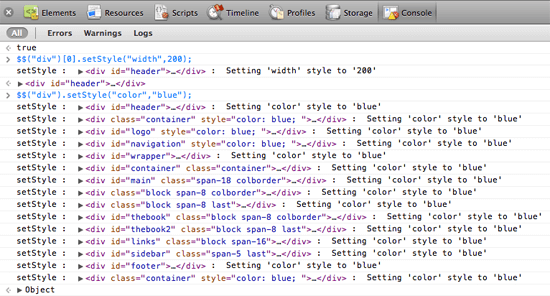
Let's face it: JavaScript development and CSS modification can be a frustrating process, especially when your web application has loads of JavaScript. One practice that is very helpful in troubleshooting CSS/JS problems is monkey-patching JavaScript prototypes and adding console statements to figure out what styles...
-
![Pro JavaScript with MooTools by Mark Obcena]()
Pro JavaScript with MooTools by Mark Obcena
With Christmas almost upon us, I wanted to throw a gift idea out there to everyone. MooTools Contributor Mark Obcena (keeto) has just finished writing his MooTools book: Pro JavaScript with MooTools. As you would expect, this book covers not just the basics of MooTools...
![MooTools Plugins Updates: LazyLoad, LightFace, ScrollSpy, and More!]()
MooTools Plugins Updates: LazyLoad, LightFace, ScrollSpy, and More!
What a busy month it's been! I've spent a good amount of time prepping my Facebook Lightbox clone, LightFace, and working to expand my Dojo Toolkit knowledge. I thought I'd take a few moments to catch you up on a few of my plugins and...
![Implement setFocus() on Elements with MooTools]()
Implement setFocus() on Elements with MooTools
Every DOM node provides a focus method but most nodes have a
tabIndexof -1 which prevents the element from being focused on when clicked, tabbed, focused via JavaScript. I've been tinkering around with ways to make focusing on any element effortless with varying results. I...
![LightFace: Facebook Lightbox for MooTools]()
LightFace: Facebook Lightbox for MooTools
One of the web components I've always loved has been Facebook's modal dialog. This "lightbox" isn't like others: no dark overlay, no obnoxious animating to size, and it doesn't try to do "too much." With Facebook's dialog in mind, I've created LightFace: a Facebook lightbox...
![Super-Powered Pseudos with MooTools’ Element.Event.Pseudo]()
Super-Powered Pseudos with MooTools’ Element.Event.Pseudo
The MooTools Team and its contributors are always looking for more efficient, creative ways to accomplish common tasks. Not only is accomplishing the task with an efficient amount of code good enough, but doing so while keeping the code legible and functionality reliable. I'm confident that...