jQuery Tutorials
![Update jQuery UI Widget Options]()
Update jQuery UI Widget Options
We're all used to passing options when instantiating an object, whether it be JavaScript or any other language. Whether or not you can update those options later is usually up to the framework, and somehow many wont let you update them once they've been passed in. Depending...
![Inspect jQuery Element Events]()
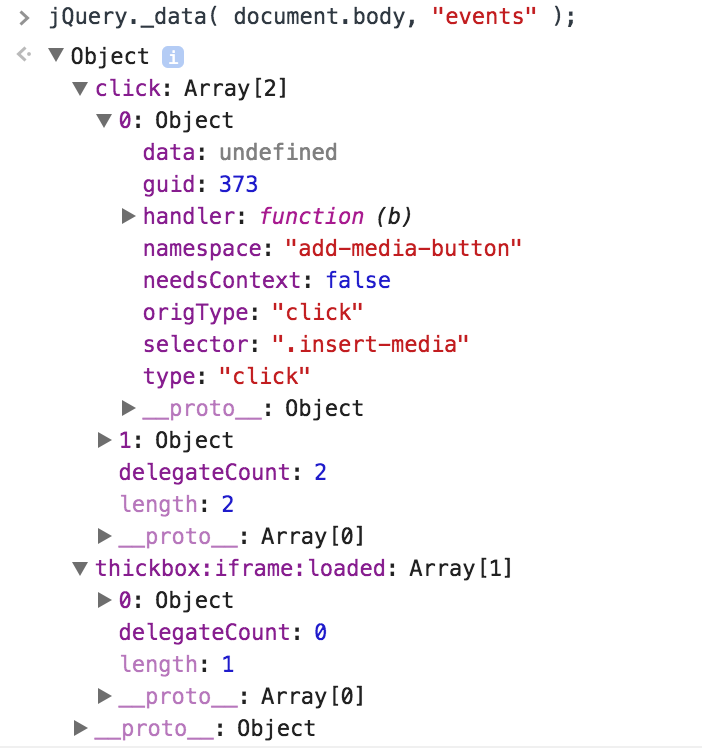
Inspect jQuery Element Events
Building on top of other tools can be incredibly difficult, especially when you didn't create the other tool and you can't replace that tool. And when those other tools create loads of event listeners, you sometimes see odd behavior within the page and have no idea what the...


![Elegant Selects with Quick[select]]()
Elegant Selects with Quick[select]
Form elements have always allowed limited styling...which is why I hate working on form display. And I started when form elements were virtually unstylable back in the Internet Explorer 4 days. Of course we've come a long way but there's one element which is still somewhat difficult to style and...
![iOS Mobile Safari Hover Menu Fix]()
iOS Mobile Safari Hover Menu Fix
One component I'm quite proud of creating is the Mozilla Developer Network's dropdown menu component. It's elegant, flexible, accessible via keyboard, and relatively compact (though it does require jQuery). One problem I did notice, however, was that tapping once opened the menu (good) but you'd have...
![Unwrapping JSON-P]()
Unwrapping JSON-P
This is a quickie simple post on JavaScript techniques. We're going to look at how to unwrap the "P" function-call padding from a JSON-P string to get the JSON from it. Note: Obviously, the recent push toward ubiquity of CORS is making JSON-P less important...
-
![CSS vs. JS Animation: Which is Faster?]()
CSS vs. JS Animation: Which is Faster?
How is it possible that JavaScript-based animation has secretly always been as fast — or faster — than CSS transitions? And, how is it possible that Adobe and Google consistently release media-rich mobile sites that rival the performance of native apps? This article serves as a point-by-point...
![jQuery: Multiple AJAX and JSON Requests, One Callback]()
jQuery: Multiple AJAX and JSON Requests, One Callback
I've been working on a new feature for the Mozilla Developer Network which requires loading of a basic script file as well as a JSON stream. Since we use jQuery, that means a
jQuery.getScriptand ajQuery.getJSON. I know those both work asynchronously and...![DO NOT TRIGGER REAL EVENT NAMES WITH JQUERY!]()
DO NOT TRIGGER REAL EVENT NAMES WITH JQUERY!
Sometimes JavaScript toolkits give us so much functionality that we can get hung by it if we're not careful. The more functionality that we use within a toolkit, the more opportunity there is to have one set of changes or additions affect another. That's especially true...

![Loading Scripts with jQuery]()
Loading Scripts with jQuery
JavaScript loaders are incredibly powerful and useful utilities. I've even covered a few of them on this blog, like curljs and LABjs, and have used RequireJS and the Dojo loader on personal projects. They're super powerful but can be overkill in some cases. If...
![5 Best Practice Mentalities to Get Over]()
5 Best Practice Mentalities to Get Over
Every developers strives to write clean, maintainable, and functional code, whether they hack on the server side or dabble on the client side. Over the last few decades of the web, we've learned from some of our early mistakes and formed a site of always...