
Build HTML Tables From MySQL Tables with PHP
I was recently completing a project which required that I build a series of HTML tables which would represent all of the tables within a MySQL database. I didn't have anything created but after a few minutes I had exactly what I needed. Hopefully this helps you out!
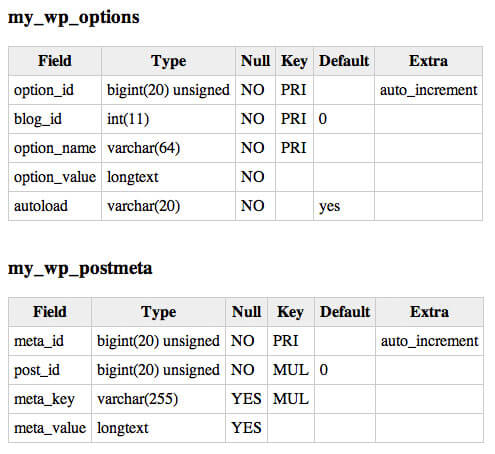
The CSS
table.db-table 		{ border-right:1px solid #ccc; border-bottom:1px solid #ccc; }
table.db-table th	{ background:#eee; padding:5px; border-left:1px solid #ccc; border-top:1px solid #ccc; }
table.db-table td	{ padding:5px; border-left:1px solid #ccc; border-top:1px solid #ccc; }
The CSS I'm styling the table with is as basic as it gets -- style as you wish!
The PHP / MySQL
/* connect to the db */
$connection = mysql_connect('localhost','username','password');
mysql_select_db('my_db',$connection);

/* show tables */
$result = mysql_query('SHOW TABLES',$connection) or die('cannot show tables');
while($tableName = mysql_fetch_row($result)) {

	$table = $tableName[0];

	echo '<h3>',$table,'</h3>';
	$result2 = mysql_query('SHOW COLUMNS FROM '.$table) or die('cannot show columns from '.$table);
	if(mysql_num_rows($result2)) {
		echo '<table cellpadding="0" cellspacing="0" class="db-table">';
		echo '<tr><th>Field</th><th>Type</th><th>Null</th><th>Key</th><th>Default<th>Extra</th></tr>';
		while($row2 = mysql_fetch_row($result2)) {
			echo '<tr>';
			foreach($row2 as $key=>$value) {
				echo '<td>',$value,'</td>';
			}
			echo '</tr>';
		}
		echo '</table><br />';
	}
}
The first step in the process is accessing all of the tables within the database. Once all tables have been fetched, the next step is to loops through the array of tables we receive and, for each table, build a new HTML table with column information.
Nothing groundbreaking but surely has use. I've also written a blog post about backing up your MySQL database with PHP titled Backup Your MySQL Database Using PHP; check that out if you'd prefer to backup your databse information in SQL format!






Tables? Really?
@Tanner: Tables for tabular data; yes.
I just don’t get it. Some people are against tables for the heck of looking cool, I believe. Tabular data will always exist, for which there will always be tables, period.
I wish those *cool* web designers would stop saying “Ewwww, tables”
Thanks for sharing this, Dee Doubl-You
Yeah, dealing with those people is frustrating. Grow up and realize tables aren’t the plague.
I always tell people to keep tables out of their sites unless they are displaying tabular data.
But when I have tabular data to display I alway go away from them.
Why? The ability to transform that data into another form later on…. Maybe
But screen readers also wont know it is a table – so that is bad.
I guess I cant explain it – I know when tables are to be used – I just dont like to use them. – Maybe the syntax?
Maybe if I could figure out what td means – t for table and d for… cell? column?
td = table data
Dave:
When I run your code, I connect to my database and see the database name and the header, but I don’t see the column names and characteristics for each of the column as in your demo.
Do you have some idea of why this might happen?
Thanks
hi David, wellcome to the dark side of server coding :D
(P.S. we have cookies :P)
William, same here. I just reorder some things, and the correct code is:
if(mysql_num_rows($result2)) { echo 'FieldTypeNullKeyDefaultExtra'; while($row2 = mysql_fetch_row($result2)) { echo ''; foreach($row2 as $key=>$value) { echo '',$value,''; } echo ''; } echo ''; }@Gregorio Espadas your code is EXACTLY like the code submitted by O.P., and I’m receiving the “cannot show columns” error, yet you’ve made no changes that should have fixed anything. The section you posted here also comes after the attempt to query columns, so I don’t know what it would have to do with the error both myself and @Wililam Rouse encountered. Elaboration?
@alex watts, there is a way to switch it. Use the code here. Remove the table name using the ‘echo “Table: $table”‘ (I may be wrong). I rely on this code every day, and it works beautifully.
Duh! HTML tags were remove in my previous comment.
Complete code here:
http://pastebin.com/cVV7rFGt
@Gregorio How is your code any different than what the OP put up? I’m receiving the same error as @William and don’t really see how looking at what you have would have lead him to change anything or for the code to start working.
Please help! ^_^
@Gregorio Espadas: Much better Greqorio, Thanks!
RE “Tables? Really?”
@Tanner Seriously, that is all you have to offer to the coding communitiy is a snobby waste of space remark…… kinda like this one :). David, thanks for the sharing of the knowledge!
Tables aren’t necessary for tabular data. In-fact, you would be better off using an unordered list and some css than a table!
As Adam Meyer stated, one problem with using tables is if you want to go back and edit the data or display it differently… you’ve got a bit of a mess on your hands. Sure, you could simply stylize your tables, but what’s to stop the tables from displaying like poop on different devices?
It all comes down to the individual developer and the purpose behind the project, I guess. Ultimately everyone is entitled to their opinion and will do what they think is best. If you love tables, go for it, no worries. But there are alternatives, some of which are more modern and fun to play with.
(Here’s the kicker: IMO.)
@Tanner: WTF is hard about editing a table? I don’t see the mess at all…
excelent! David What happened with mootools ?
Welcome to the server-side ;) Mootools is about objects and so is server-side programming. So instead of using the old procedural mysql_* interface, you should have a look at PDO.
I have noticed while mysql is outdated many professional developers still depend on outdated mysql rather than using mysqli which is more secure and faster. As Markus said at least PDO. otherwise goodwork
Its nice, Good work.
You might try and go an extra step. Upon load show databases. Click a database and show tables. Click a table and you could display 10 rows and the structure. May need some breadcrumbs at this point.
Tables are just a tool people. There are instances where they should be used, but this is not for design.
http://www.serebii.net/index2.shtml
That website does a splendid job using tables they way they should be used.
That website uses a tabled layout, which is not exactly recommended.
Hey guys, Im totally new to PHP but this is exactly what I need. What sort of privilege do you guys give to a user that only wants to fetch data to display (as above) ? Any help would be great!
Not so hard to construct.. ;)
Any ways thanks ;)
Hey what can i do if i dont want to show all of the coloumns…
Like what if i dont wanna show Column of field and type
This is nice. How would you go about showing the data in the tables in place of the table setup.
THANK YOU SO MUCH…. U SAVED MY LIFE….
*nodding*
yea, man! Kudos! This enables me to have my webapp to auto generate the class and self-select from database and initiate the query on its own without my having to go to phpMyAdmin.
You rock, dude!
I can’t display by html table on Mysql Data.can any one pls help me
Great piece of script, works just fine! And tables will always exist, look the Microsoft Excel for example, strong and going on :)
Thanks for this great piece. It helped me solve an issue with displaying data using html table within seconds.
All Event are Shown What You want
<?php error_reporting(E_STRICT); $host="127.0.0.1"; $username="root"; $password=""; $db="home"; mysql_connect("$host","$username","$password") or die("cannot connect"); mysql_select_db("$db") or die("can not select database"); $sql = "SELECT * FROM peson"; $result=mysql_query($sql); echo ""; echo " ID Event Name Starting Date Ending Date About Event Action "; while($row = mysql_fetch_array($result)){ echo"" .$row['id'] .""; echo "".$row['eventn'].""; echo"".$row['startingd'].""; echo"".$row['endingd'].""; echo"". $row['aboute'] . ""; echo "update/delete"; } echo""; mysql_close(); /*if($result) { die('Data has been Entered'.mysql_error()); } else { echo "Did not Entered"; } */ ?>Thank you for this!
@Gregorio How is your code any different than what the OP put up? I’m receiving the same error as @William and don’t really see how looking at what you have would have lead him to change anything or for the code to start working.
Please help! ^_^
I am currently using the PHP script to insert database data into my table. However I was wondering if you have a similar PHP script inserting database data into a Flexbox column since Flexbox do not have tables. They are using columns total calculation so when the total of columns reaches 100% then new column is created on the next row( they do not have rows ). Every 100% total creates new one. The columns could be one, two, three or more as long as the total do not exceed 100%. Any idea how I can accomplish this by using something similar like your PHP script for tables.
Never echo out html. It’s ugly and don’t follow the principle of separation of view and model.