Fix WebKit Checkbox Overflow
I want to share a quick tip about working with checkboxes in Chrome and Safari, the WebKit-based browsers. I was recently working with a series of checkboxes when I noticed that Safari and Chrome were doing some funky "cut off" with them:
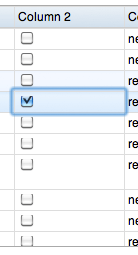
What's even weirder is that they were randomly fix and unfix themselves as you hover over them. Horrible! After a bit of tinkering, I discovered the solution was adding a line-height of 20px to the parent the checkbox:
.checkboxList li { /* ..or whatever the parent is */
	line-height: 20px;
}
Twenty pixels should be considered the minimum -- anything smaller wont prevent the problem completely.
![Create Spinning Rays with CSS3: Revisited]()
![Introducing MooTools Templated]()
One major problem with creating UI components with the MooTools JavaScript framework is that there isn't a great way of allowing customization of template and ease of node creation. As of today, there are two ways of creating:
new Element Madness
The first way to create UI-driven...
![CSS :target]()
One interesting CSS pseudo selector is :target. The target pseudo selector provides styling capabilities for an element whose ID matches the window location's hash. Let's have a quick look at how the CSS target pseudo selector works!
The HTML
Assume there are any number of HTML elements with...
![CSS Ellipsis Beginning of String]()
I was incredibly happy when CSS text-overflow: ellipsis (married with fixed width and overflow: hidden was introduced to the CSS spec and browsers; the feature allowed us to stop trying to marry JavaScript width calculation with string width calculation and truncation. CSS ellipsis was also very friendly to...






This actually didn’t work for me. I had to give the checkboxes display:block and a height of 20px.