
Tips for Working Remotely and Enjoying It!
With the coronavirus spreading and employers telling employees work from home if possible, there are scores of people getting their first taste of working remotely. Depending on your experience and discipline levels, this could be a welcomed change or a complete culture shock. The amount of freedom your find yourself in can be similar the leaving high school -- no one telling you what to do, where to go, etc -- but don't let that freedom cost you your job.
I've worked remotely for a decade so I thought I'd take this opportunity to provide some tips for working remotely!
Create an Enjoyable Working Environment
Some will see working remotely as "being stuck at home", and if you've seen some of the amazing silicon valley offices, you might feel that way too. It's incredibly important to create a fun work environment for yourself. Check out my office:
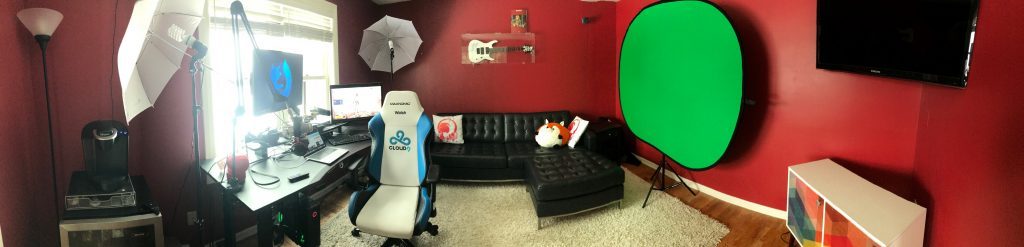
My office is the equivalent to a nerd's man cave. Sure, I could get distracted by the video games and TV but I have the discipline to handle those toys. The key point is to make your home workspace a place you want to be!
Stick to a Schedule
Keeping a set schedule for your work hours is the most important part of successfully working remotely. This schedule will keep you honest, set availability expectations for your colleagues, and lay the base for a successful routine. Without this set schedule, you can convince yourself "I'll get to that later today or tonight", but rarely does that succeed. I have a set 9-5 schedule so that I can get my kids ready for school and give my family attention at dinner -- and it works wonderfully for me!
Communicate Often with Your Team!
"No office" doesn't mean "no meetings"! If decisions need to be made, someone needs help, or you just need to see a friendly face, be sure to hop onto quick video calls so that you can push forward with your work. I will oftentimes ask my colleague for a quick call and that 10 minute chat will be a launchpad for me to work on something for the entire day. Don't let yourself or your team get stuck -- communication is key!
Communicate with Your Partner
One aspect of remote work that I still sometimes struggle with is avoiding distractions from family. Your partner may see your being home as "Oh, I'll go ask him to start lunch" or "hey, can you help me with the laundry?" It's important that your partner know you need to focus and that being home doesn't mean being available. It takes time to get used to, especially if you have children, but I promise that discussion will save you frustration as you continue working remotely!
Avoid Distractions
At home you have video games, televisions, neighbors, chores to be done, and a whole host of other distractions just vying for your attention. Finding the discipline to avoid these distractions is the key to working remotely. Work in a bedroom or your dining room if it helps -- anything to help you stay focused!
Quick Hits
A few more small pointers:
- Dress for success: the lure of wearing pajamas may tug at you but don't fall for it -- dress professionally and you'll feel professional!
- Eat well: don't snack on garbage all day -- it will put you to sleep! Eat well and you'll feel better!
- Get away: once your work hours are over, put down the computer and do something else. Don't overwork because your computer is always there!
Working remotely can be a really awesome experience if you can get the basics down. If only for a few weeks, put yourself in a situation to be successful at home!





I have been working from home for the last few days and after a few hours it gets really tedious and boring. So this post is really helpful in this situation. Thank you!
Great article.
Hi David,
Excellent article, I shared it on linked in as well. It inspired me to really organize my home office setup! I would add a couple things mostly to the Wellness section:
– Move often; stand and work whenever possible (if you don’t have a sit-to-stand setup yet, stand with a laptop at a counter possible)
– Mix up the coffee routine, try different methods randomly, french press, pour over, cold brew, espresso.
– Stay hydrated (until it’s time for a beer, then dehydrate)!
Thanks for the post, David. Team communication is literally the most important thing in teamwork. Especially now, when the COVID situation can continue way over 2020. Thanks to different software like https://www.skype.com/, https://trello.com/, https://www.worktime.com/, and Google Sheets, we can work together as if nothing happened, but at home.