Tutorials Page 165
![Prototype’s Element.on with MooTools]()
Prototype’s Element.on with MooTools
Prototype 1.7RC1 was released on Monday. While the big news with this release appears to be the implementation of John Resig's Sizzle selector engine, what caught my eye was the new on method. This new Element.on method is very similar to Prototype's...
![Smooth Scrolling with MooTools Fx.SmoothScroll]()
Smooth Scrolling with MooTools Fx.SmoothScroll
I get quite a few support requests for my previous MooTools SmoothScroll article and the issue usually boils down to the fact that SmoothScroll has become Fx.SmoothScroll. Here's a simple usage of Fx.SmoothScroll. The HTML The only HTML requirement for Fx.SmoothScroll is that all named...


![MooTools Zoomer Plugin]()
MooTools Zoomer Plugin
I love to look around the MooTools Forge. As someone that creates lots of plugins, I get a lot of joy out of seeing what other developers are creating and possibly even how I could improve them. One great plugin I've found is...
![Growl-Style Notifications Using MooTools Roar]()
Growl-Style Notifications Using MooTools Roar
When I think of premier MooTools plugin developers, Harald "digitarald" Kirschner is usually one of the first people that come to mind. Harald has built some of MooTools' most popular plugins, including AutoCompleter, FancyUpload, and History Manager. My favorite plugin created...
![JavaScript: Condensed Code vs. Readability]()
JavaScript: Condensed Code vs. Readability
I've been coding some more advanced JavaScript applications lately and they've made me think a lot about coding styles. More specifically: shortness of code vs. readability. My Mindset I can be a conflicted developer sometimes, so here are a few thoughts that go through my mind: "Tools...
-
![Video: Speed Up Your JavaScript]()
Video: Speed Up Your JavaScript
I generally try to listen to JavaScript/development podcasts and videos when I'm working. It's a great way to continue to learn and get ideas while doing the ho hum programming busywork that's unavoidable. Here's a great Google Talks presentation that was given last summer about JavaScript...
![Create Classy Inputs Using MooTools’ OverText]()
Create Classy Inputs Using MooTools’ OverText
The MooTools More library is a goldmine. A treasure chest. Pirates booty, if you will (and, of course, I will). More is full of plugins that add a lot of class and functionality to your website with minimal effort.
![Track Clicks Outside Active Elements with MooTools or jQuery]()
Track Clicks Outside Active Elements with MooTools or jQuery
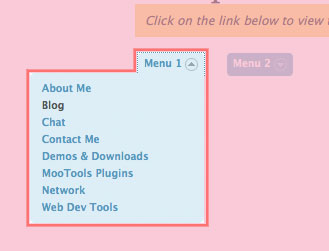
Buried in the MooTools and jQuery code from my Twitter Dropdowns posts was a small but useful snippet of code: hide an "active" element when the user clicks outside of the elements. Take a look at the image above. When you click the "Menu 1"...

![Create a Quick MooTools Slideshow with Preloading Images]()
Create a Quick MooTools Slideshow with Preloading Images
I've been creating a lot of slideshow posts lately. Why, you ask? Because they help me get chicks. A quick formula for you: The following code snippet will show you how to create a simple slideshow with MooTools; the script will also...
![Create Twitter-Style Dropdowns Using jQuery]()
Create Twitter-Style Dropdowns Using jQuery
Twitter does some great stuff with JavaScript. What I really appreciate about what they do is that there aren't any epic JS functionalities -- they're all simple touches. One of those simple touches is the "Login" dropdown on their homepage. I've taken...