Get React Component Data by DOM Node

By  on  

Retrieving a React component's DOM node is fairly simple from within the component itself, but what if you want to work backward:  retrieve a component's instance by DOM node?  This is a task that the old Dojo Toolkit's Dijit framework allowed with the dijit.byId method, so it made me think if you could do the same with React.  It turns out you can retrieve a component instance by DOM node!

The following function allows you to get a React component instance by DOM node:

function findReactElement(node) {
    for (var key in node) {
        if (key.startsWith("__reactInternalInstance$")) {
            return node[key]._debugOwner.stateNode;
        }
    }
    return null;
}

If the node is a React component root, you'll see a load of amazing information, like its props, state, context, refs, list of methods, and more:
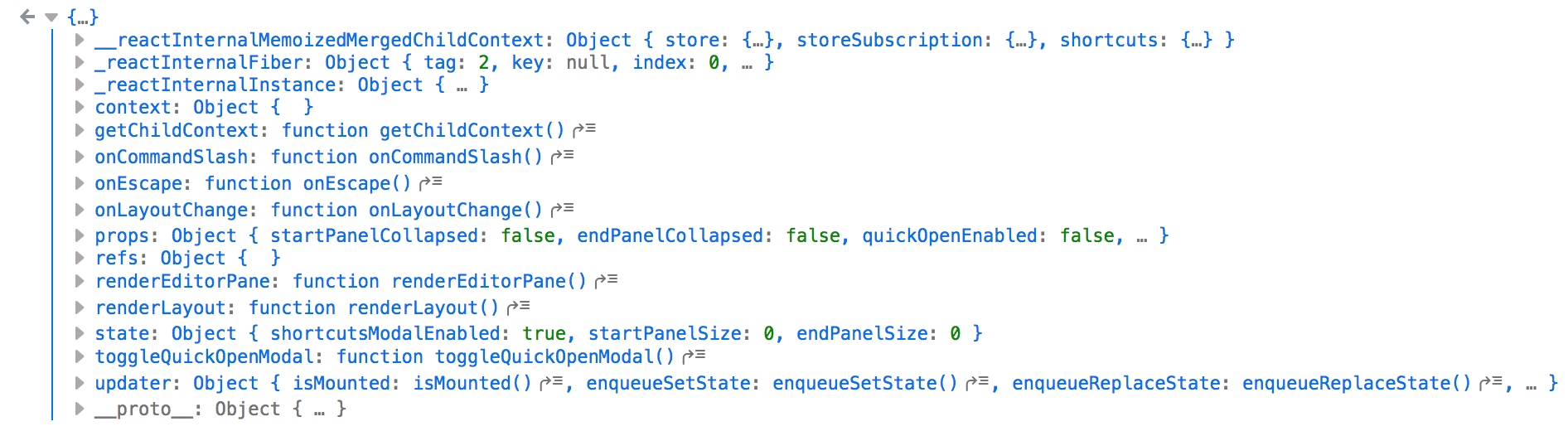
React Element State

Modifying props/state and calling render methods don't appear to actually do anything, so manipulation doesn't look possible from the outside, but it is useful to be able to get the component instance based on DOM node if for nothing other than inspection.  Nice!

Recent Features

  • By
    Animated 3D Flipping Menu with CSS

    CSS animations aren't just for basic fades or sliding elements anymore -- CSS animations are capable of much more.  I've showed you how you can create an exploding logo (applied with JavaScript, but all animation is CSS), an animated Photo Stack, a sweet...

  • By
    Create Namespaced Classes with MooTools

    MooTools has always gotten a bit of grief for not inherently using and standardizing namespaced-based JavaScript classes like the Dojo Toolkit does.  Many developers create their classes as globals which is generally frowned up.  I mostly disagree with that stance, but each to their own.  In any event...

Incredible Demos

  • By
    Create a Quick MooTools Slideshow with Preloading Images

    I've been creating a lot of slideshow posts lately. Why, you ask? Because they help me get chicks. A quick formula for you: The following code snippet will show you how to create a simple slideshow with MooTools; the script will also...

  • By
    Morphing Elements Using MooTools and CSS

    Morphing an element between CSS classes is another great trick the MooTools JavaScript library enables you to do. Morphing isn't the most practical use of MooTools, but it's still a trick at your disposal. Step 1: The XHTML The block of content that will change is...

Discussion

  1. Hristo

    This is not a good practice in my opinion. What if React change these properties in the next versions? In general this approach seems counter-OOP, it’s like stirring in the gut…

  2. The function can be shortened to using latest es6. But not sure if this is best way

    const findReactElement = (node) => node[Object.keys(node).find(key => key.startsWith('__reactInternalInstance$'))]?._debugOwner?.stateNode || null
    

Wrap your code in <pre class="{language}"></pre> tags, link to a GitHub gist, JSFiddle fiddle, or CodePen pen to embed!