
httpstat: Simple cURL Stats
There are a lot of tools out there that do great, advanced things but present them as well as they could be presented. I wont knock cURL for anything -- it's an amazing tool many of us can't live without; what I will say, however, is that it's nice having tools on top of cURL for better presentation or extended functionality.
I recently discovered httpstat, which is a single python file which (simply) graphically displays request event timing, from DNS lookup to content transfer:
python httpstat.py https://davidwalsh.name/page/1
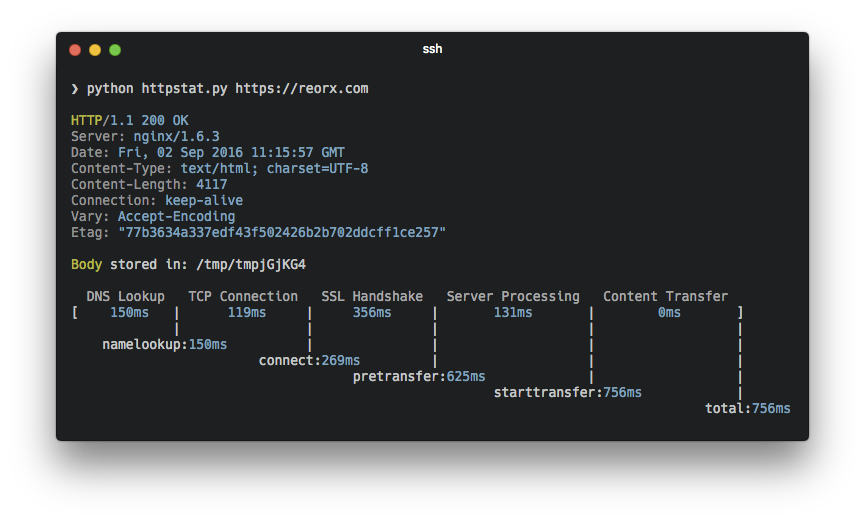
What you get in the end is an ASCII table showing how long each step took. Of big interest to me is the "server processing" step -- if this number is large, you can probably do some things to your code or server to speed things up.
Grab httpstat and check out your site speed -- you might not be happy with the numbers!






Hi David, the utility is also available via Homebrew for Mac users.
Cheers.
Off Topic: what is the colour scheme of the terminal in the screenshot?
Looks like solarized with a darker background color.
There is also a node module wrapper for this up on NPM, works like a charm.
https://www.npmjs.com/package/httpstat
Awesome script! I’ve always relied on speedgun.io to generate similar stats, but it needs phantomjs.
Sometimes I just need download info, and this looks like a great option.