April Fools! Change Your PHP Pages to ASP…Or Not
I don't know a lot of PHP developers that think very much of ASP. This, of course, sets the stage for a great April fools trick: we're going to change all of the links on our website from ".php" to ".asp" and see how many coworkers we can confuse the hell out of. Granted, most developers with a just few years of experience would figure out the method within a few minutes, but you can probably get the noob with this one.
Step One - Change the Links
<!-- FROM -->
<a href="/some-page.php">Click here</a>

<!-- TO -->
<a href="/some-page.asp">Click here</a>
Step Two - The .htaccess Code
AddType application/x-httpd-php .asp
Have fun and trick some people today!
![JavaScript Promise API]()
While synchronous code is easier to follow and debug, async is generally better for performance and flexibility. Why "hold up the show" when you can trigger numerous requests at once and then handle them when each is ready? Promises are becoming a big part of the JavaScript world...
![Send Text Messages with PHP]()
Kids these days, I tell ya. All they care about is the technology. The video games. The bottled water. Oh, and the texting, always the texting. Back in my day, all we had was...OK, I had all of these things too. But I still don't get...
![HTML5 download Attribute]()
I tend to get caught up on the JavaScript side of the HTML5 revolution, and can you blame me? HTML5 gives us awesome "big" stuff like WebSockets, Web Workers, History, Storage and little helpers like the Element classList collection. There are, however, smaller features in...
![Duplicate the jQuery Homepage Tooltips]()
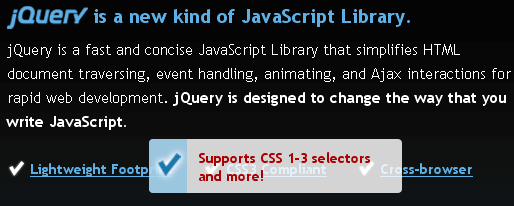
The jQuery homepage has a pretty suave tooltip-like effect as seen below:
The amount of jQuery required to duplicate this effect is next to nothing; in fact, there's more CSS than there is jQuery code! Let's explore how we can duplicate jQuery's tooltip effect.
The HTML
The overall...