Fix WebKit Checkbox Overflow
I want to share a quick tip about working with checkboxes in Chrome and Safari, the WebKit-based browsers. I was recently working with a series of checkboxes when I noticed that Safari and Chrome were doing some funky "cut off" with them:
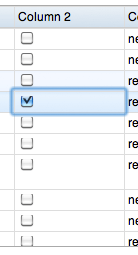
What's even weirder is that they were randomly fix and unfix themselves as you hover over them. Horrible! After a bit of tinkering, I discovered the solution was adding a line-height of 20px to the parent the checkbox:
.checkboxList li { /* ..or whatever the parent is */
	line-height: 20px;
}
Twenty pixels should be considered the minimum -- anything smaller wont prevent the problem completely.
![7 Essential JavaScript Functions]()
I remember the early days of JavaScript where you needed a simple function for just about everything because the browser vendors implemented features differently, and not just edge features, basic features, like addEventListener and attachEvent. Times have changed but there are still a few functions each developer should...
![6 Things You Didn’t Know About Firefox OS]()
Firefox OS is all over the tech news and for good reason: Mozilla's finally given web developers the platform that they need to create apps the way they've been creating them for years -- with CSS, HTML, and JavaScript. Firefox OS has been rapidly improving...
![Build a Toggling Announcement Slider Using MooTools 1.2]()
A few of my customer have asked for me to create a subtle but dynamic (...I know...) way for them to advertise different specials on their website. Not something that would display on every page, but periodically or only the homepage. Using a trick...
![Create a Dynamic Flickr Image Search with the Dojo Toolkit]()
The Dojo Toolkit is a treasure chest of great JavaScript classes. You can find basic JavaScript functionality classes for AJAX, node manipulation, animations, and the like within Dojo. You can find elegant, functional UI widgets like DropDown Menus, tabbed interfaces, and form element replacements within...






This actually didn’t work for me. I had to give the checkboxes display:block and a height of 20px.