.htaccess Tutorials
![How to Block a Range of IP Addresses]()
How to Block a Range of IP Addresses
As much as content creators want traffic to their website, there is such thing as the wrong type of traffic. Sometimes it's content scrapers, sometimes it's malicious bots; either way, it's important to know how to block problematic IPs from your site.To block a range...
![How Hacker News Crushed David Walsh Blog]()
How Hacker News Crushed David Walsh Blog
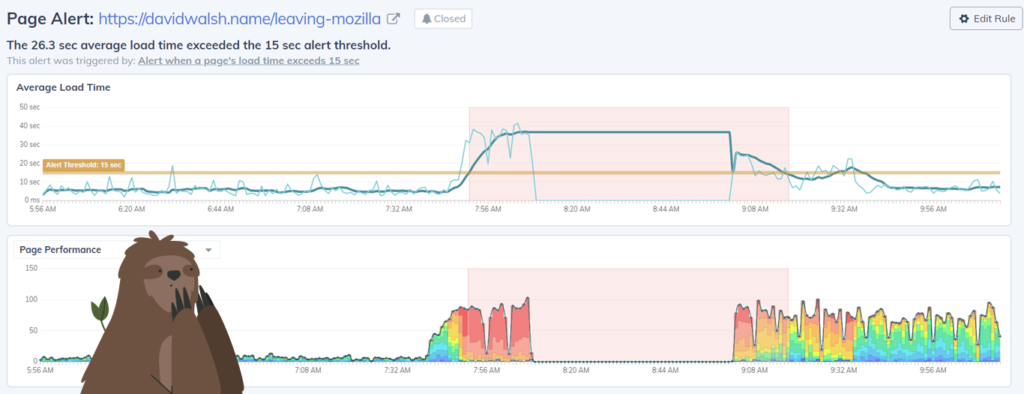
Earlier this month, David’s heartfelt posting about leaving Mozilla made the front page of Hacker News. Traffic increased by 800% to his already-busy website, which slowed and eventually failed under the pressure. Request Metrics monitors performance and uptime for David’s blog, and our metrics...


![Prevent JavaScript Hotlinking with .htaccess]()
Prevent JavaScript Hotlinking with .htaccess
Almost a decade (!) ago I wrote a post about preventing image hotlinking. We all have the right to protect imagery hosted on our domain because it can slow our site down tremendously. I love that post because it shows you how to replace the...
![500]()
500
Over the past four or so months, I've been having a hell of a time with seeing 500 errors on my site. And while I'm on my site a few hours a day, the amount of 500s my visitors must have seem is probably huge. And that's...
![Serve SVG as an Image on Apache with .htaccess]()
Serve SVG as an Image on Apache with .htaccess
I've been a massive fan of SVG since my days creating charts and animations with the Dojo Toolkit. SVG has been around forever, it even has IE support now, and it's ultra-flexible. When creating this site's redesign, I used SVG within an IMG tag and...
-
![Cross Domain Canvas Images]()
Cross Domain Canvas Images
You can do some really awesome stuff with images when you push their data into canvas. And of course, when you're done playing around with the image, you can export the canvas data to an IMG element and data URI. What we sometimes don't...
![5 .htaccess Snippets to Borrow from HTML5 Boilerplate]()
5 .htaccess Snippets to Borrow from HTML5 Boilerplate
HTML5 Boilerplate is an awesome website template when you want all best pieces in place for you when you start your project. A while back I covered 7 CSS Snippets to Borrow from HTML5 Boilerplate, so today I want to feature a few...
![robots.txt Rerouting on Development Servers]()
robots.txt Rerouting on Development Servers
Every website should have a robots.txt file. Some bots hit sites so often that they slow down performance, other bots simply aren't desirable. robots.txt files can also be used to communicate sitemap location and limit request rate. It's important that the correct robots.txt file is served...

![Serving Fonts from CDN]()
Serving Fonts from CDN
For maximum performance, we all know we must put our assets on CDN (another domain). Along with those assets are custom web fonts. Unfortunately custom web fonts via CDN (or any cross-domain font request) don't work in Firefox or Internet Explorer (correctly so, by spec) though...
![Prepend and Append Files with .htaccess]()
Prepend and Append Files with .htaccess
One of the lessor known and used capabilities of .htaccess files is the ability to prepend and append includes to every page request. Doing so avoids needing to code
<?php require('footer.php'); ?>in every template file you wat to use them in. Here's the .htaccess code: Now...