
Build a Calendar Using PHP, XHTML, and CSS
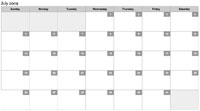
One of the website features my customers love to provider their web users is an online dynamic calendar. An online calendar can be used for events, upcoming product specials, memos, and anything else you can think of. I've taken some time to completely rewrite the PHP event calendar so that I may share it with you.
The CSS
/* calendar */
table.calendar		{ border-left:1px solid #999; }
tr.calendar-row	{  }
td.calendar-day	{ min-height:80px; font-size:11px; position:relative; } * html div.calendar-day { height:80px; }
td.calendar-day:hover	{ background:#eceff5; }
td.calendar-day-np	{ background:#eee; min-height:80px; } * html div.calendar-day-np { height:80px; }
td.calendar-day-head { background:#ccc; font-weight:bold; text-align:center; width:120px; padding:5px; border-bottom:1px solid #999; border-top:1px solid #999; border-right:1px solid #999; }
div.day-number		{ background:#999; padding:5px; color:#fff; font-weight:bold; float:right; margin:-5px -5px 0 0; width:20px; text-align:center; }
/* shared */
td.calendar-day, td.calendar-day-np { width:120px; padding:5px; border-bottom:1px solid #999; border-right:1px solid #999; }
The above code is complete with IE6 hacks.
The PHP
/* draws a calendar */
function draw_calendar($month,$year){

	/* draw table */
	$calendar = '<table cellpadding="0" cellspacing="0" class="calendar">';

	/* table headings */
	$headings = array('Sunday','Monday','Tuesday','Wednesday','Thursday','Friday','Saturday');
	$calendar.= '<tr class="calendar-row"><td class="calendar-day-head">'.implode('</td><td class="calendar-day-head">',$headings).'</td></tr>';

	/* days and weeks vars now ... */
	$running_day = date('w',mktime(0,0,0,$month,1,$year));
	$days_in_month = date('t',mktime(0,0,0,$month,1,$year));
	$days_in_this_week = 1;
	$day_counter = 0;
	$dates_array = array();

	/* row for week one */
	$calendar.= '<tr class="calendar-row">';

	/* print "blank" days until the first of the current week */
	for($x = 0; $x < $running_day; $x++):
		$calendar.= '<td class="calendar-day-np"> </td>';
		$days_in_this_week++;
	endfor;

	/* keep going with days.... */
	for($list_day = 1; $list_day <= $days_in_month; $list_day++):
		$calendar.= '<td class="calendar-day">';
			/* add in the day number */
			$calendar.= '<div class="day-number">'.$list_day.'</div>';

			/** QUERY THE DATABASE FOR AN ENTRY FOR THIS DAY !!  IF MATCHES FOUND, PRINT THEM !! **/
			$calendar.= str_repeat('<p> </p>',2);

		$calendar.= '</td>';
		if($running_day == 6):
			$calendar.= '</tr>';
			if(($day_counter+1) != $days_in_month):
				$calendar.= '<tr class="calendar-row">';
			endif;
			$running_day = -1;
			$days_in_this_week = 0;
		endif;
		$days_in_this_week++; $running_day++; $day_counter++;
	endfor;

	/* finish the rest of the days in the week */
	if($days_in_this_week < 8):
		for($x = 1; $x <= (8 - $days_in_this_week); $x++):
			$calendar.= '<td class="calendar-day-np"> </td>';
		endfor;
	endif;

	/* final row */
	$calendar.= '</tr>';

	/* end the table */
	$calendar.= '</table>';

	/* all done, return result */
	return $calendar;
}

/* sample usages */
echo '<h2>July 2009</h2>';
echo draw_calendar(7,2009);

echo '<h2>August 2009</h2>';
echo draw_calendar(8,2009);
The PHP is largely based upon one function that only requires the month and year of the calendar you'd like. It's a sizable function but obviously worth its weight in gold. Also note that I've identified a spot within the calendar where you should query the database to see if there are any events for that day. I use tables because they nicely stretch when one day in the week is longer than others. Working with absolute positioning and DIVs in the calendar is far too much hassle for a simple calendar.
I look forward to seeing what you can do with the calendar!






That takes me back.
One of the first things I ever used mootools for was to build 2 calendars.
Personally I hate tables, so I did it table less.
One of the places specifically wanted a calendar with NO weekends. Other other was a project of my own. To create a calendar that would deal with 50+ events on a single day in a usable fashion.
Looking at them now reminds me of just how far I have come.
you can see them here.
http://osl.risd.edu/calendar/index.php
http://www.respond-design.org/index.php?month=2&year=2009
Sweet! I’ve been trying to psych myself into doing this and rebuild a whole events page I have. I’ve been using a JavaScript-based calendar and it works but… This just looks some much cleaner and probably will get searched better by the spiders. Thanks for a big start on my events page rewrite!
That’s some pretty good code David, but google calendar really makes all other calendars obsolete, it’s just so easy and logical to use.
You cannot run SQL queries against the data stored in Google Calendar
Awesome. Thanks very helpfull.
This is great. I just finished figuring out how to make a php calendar myself about 3wks ago to use in symfony. I will probably borrow a few ideas from you to update my calendar.
Nice tutorial, your right this is a feature request that often comes up. I would suggest you do one query to the db before the loop and just check the returned data for each day. Would cut down on the overhead of doing a hit for every day.
@Adriaan: I have to disagree, while Google Calendar is wonderful and I use it myself, having a custom calendar integrated into your website/application is quite often superior.
@Louis W: That would be a good idea, but I wanted to keep it simple for the sake of this article. If I started preaching database, the article would’ve been a mile long. :)
It will be best if you make it event calender, i can use it ;)
Thanks!
Excellent coding!
Line 12 (PHP snippet): ‘w’ needs quoted.
I used the following code for calendar events. You need to include the arrays as arguments to the function signature if you populate them externally (or use global array/keyword).
/* QUERY THE DATABASE FOR AN ENTRY FOR THIS DAY !! IF MATCHES FOUND, PRINT THEM !! */ $keys = array('comment', 'shout', 'submission'); foreach ($keys as $key) { ${$key . '_events'} = 0; foreach (${$key . 's'} as $event) { $event_datetime = strtotime($event[$key . '_datetime']); $event_day = date('j', $event_datetime); $event_month = date('F', $event_datetime); $event_year = date('Y', $event_datetime); $now_datetime = mktime(0, 0, 0, $month, $list_day, $year); $now_day = date('j', $now_datetime); $now_month = date('F', $now_datetime); $now_year = date('Y', $now_datetime); if (($event_day == $now_day) && ($event_month == $now_month) && ($event_year == $now_year)) { ${$key . '_events'} += 1; } } if (${$key . '_events'} > 0) $calendar .= '<div class="calendar-event ' . $key . '">' . ${$key . '_events'} . ' ' . $key . (${$key . '_events'} > 1 ? 's' : '' ) . '</div>'; }Instead of using the table cellpadding and cellspacing put the padding in the CSS and the spacing-glitches you can fend off using border-collapse:collapse for the table. Remember to then put margin and padding on the td’s and the th’s.
@Sebastiaan: Margin on the TD’s and TH’s? That wont work.
Here’s my slightly revised code, works like a charm on all major Windblows browsers (only IE6 doesn’t do the hover-thing):
print("table.calendar { border-left:1px solid #999; border-collapse:collapse; } tr.calendar-row { } td.calendar-day { min-height:80px; font-size:1.0em; position:relative; margin:0; padding:0; } * html div.calendar-day { height:80px; } td.calendar-day:hover { background-color:#eceff5; margin:0; padding:5px; } td.calendar-day-np { background-color:#eee; margin:0; padding:0; min-height:80px; } * html div.calendar-day-np { height:80px; } td.calendar-day-head { background-color:#ccc; font-weight:bold; text-align:center; width:120px; padding:5px; margin:0; border-bottom:1px solid #999; border-top:1px solid #999; border-right:1px solid #999; } div.day-number { background:#999; padding:5px; color:#fff; font-weight:bold; float:right; margin:-5px -5px 0 0; width:20px; text-align:center; } td.calendar-day, td.calendar-day-np { width:120px; padding:5px; border-bottom:1px solid #999; border-right:1px solid #999; margin:0; }");Of course removing the cellpadding and cellspacing parameters in the table-tag.
@Sebastiaan – Ah…for margin on cells you’d have to use a combination of border-spacing and border-collapse. These are not fully supported by our special friend though, so you’re better off using cellspacing and cellpadding, like David suggests :)
Yeah, but I’m a standardista so I prefer NOT to use any inline styles or parameters on a tag that should be in a CSS. So IE6 users won’t get the desired effect, but no lack in functionality. The whole idea of my initial comment was removing the cellpadding and cellspacing from the table-tag ;-) My changes actually work in IE6, they only won’t get the hover effect, but that was so in the original code as well!
Hello from Spain and thanks for the script. My small contribution: if you want to start your calendar week on monday, change
print(" $running_day = date('w',mktime(0,0,0,$month,1,$year))");toprint( $running_day = date('w',mktime(0,0,0,$month,1,$year))-1;");see you.Hei,
This is not working when first day of a month is sunday, for example mai 2011 and august 2010. Have you any solution for that issue?
I think I found a solution. Problem was that when 1st day of the month is sunday then $running_day got -1 as value. This fixes that issue:
$running_day = date('w',mktime(0,0,0,$month,1,$year)); $running_day = ($running_day > 0) ? $running_day-1 : $running_day; // First day mondayhey guys,
dont know if someone already posted such modifications in order to start with monday, however, here is another solution:
adapt these lines:
$headings = array('Mo','Di','Mi','Do','Fr','Sa','So'); //reorder labels, starting with monday $running_day = date('N',mktime(0,0,0,$month,1,$year))-1; //date('N') returns 1-7, starting with mondayThis should be working:
(date('w') + 6) % 70 = Monday, 1 = Tuesday, … , 6 = Sunday
Can someone throw me a bone? The basic calendar is displayed, but is not formated like the demo (maybe css issue) and when I attempted to implement the controls, I don’t see them at all. Can someone help me out?
@Steve: can you post your code somewhere or give us the URL to the live page?
http://www.davislegal.net/MyPACE/calendar.php
Thanks for any help you can provide.
Steve
/* calendar */ table.calendar { border-left:1px solid #999; } tr.calendar-row { } td.calendar-day { min-height:80px; font-size:11px; position:relative; } * html div.calendar-day { height:80px; } td.calendar-day:hover { background:#eceff5; } td.calendar-day-np { background:#eee; min-height:80px; } * html div.calendar-day-np { height:80px; } td.calendar-day-head { background:#ccc; font-weight:bold; text-align:center; width:120px; padding:5px; border-bottom:1px solid #999; border-top:1px solid #999; border-right:1px solid #999; } div.day-number { background:#999; padding:5px; color:#fff; font-weight:bold; float:right; margin:-5px -5px 0 0; width:20px; text-align:center; } /* shared */ td.calendar-day, td.calendar-day-np { width:120px; padding:5px; border-bottom:1px solid #999; border-right:1px solid #999; }/* date settings */ $month = (int) ($_GET['month'] ? $_GET['month'] : date('m')); $year = (int) ($_GET['year'] ? $_GET['year'] : date('Y')); /* select month control */ $select_month_control = ''; for($x = 1; $x <= 12; $x++) { $select_month_control.= ''.date('F',mktime(0,0,0,$x,1,$year)).''; } $select_month_control.= ''; /* select year control */ $year_range = 7; $select_year_control = ''; for($x = ($year-floor($year_range/2)); $x <= ($year+floor($year_range/2)); $x++) { $select_year_control.= ''.$x.''; } $select_year_control.= ''; /* "next month" control */ $next_month_link = 'Next Month >>'; /* "previous month" control */ $previous_month_link = '<< Previous Month'; /* bringing the controls together */ $controls = ''.$select_month_control.$select_year_control.' '.$previous_month_link.' '.$next_month_link.' '; echo 'November 2009'; echo draw_calendar(11,2009); ?> <? /* draws a calendar */ function draw_calendar($month,$year){ /* draw table */ $calendar = ''; /* table headings */ $headings = array('Sunday','Monday','Tuesday','Wednesday','Thursday','Friday','Saturday'); $calendar.= ''.implode('',$headings).''; /* days and weeks vars now ... */ $running_day = date('w',mktime(0,0,0,$month,1,$year)); $days_in_month = date('t',mktime(0,0,0,$month,1,$year)); $days_in_this_week = 1; $day_counter = 0; $dates_array = array(); /* row for week one */ $calendar.= ''; /* print "blank" days until the first of the current week */ for($x = 0; $x < $running_day; $x++): $calendar.= ' '; $days_in_this_week++; endfor; /* keep going with days.... */ for($list_day = 1; $list_day <= $days_in_month; $list_day++): $calendar.= ''; /* add in the day number */ $calendar.= ''.$list_day.''; /** QUERY THE DATABASE FOR AN ENTRY FOR THIS DAY !! IF MATCHES FOUND, PRINT THEM !! **/ /* $keys = array(’comment’, ’shout’, ’submission’); foreach ($keys as $key) { ${$key . ‘_events’} = 0; foreach (${$key . ’s’} as $event) { $event_datetime = strtotime($event[$key . '_datetime']); $event_day = date(’j', $event_datetime); $event_month = date(’F', $event_datetime); $event_year = date(’Y', $event_datetime); $now_datetime = mktime(0, 0, 0, $month, $list_day, $year); $now_day = date(’j', $now_datetime); $now_month = date(’F', $now_datetime); $now_year = date(’Y', $now_datetime); if (($event_day == $now_day) && ($event_month == $now_month) && ($event_year == $now_year)) { ${$key . ‘_events’} += 1; } } if (${$key . ‘_events’} > 0) $calendar .= ‘’ . ${$key . ‘_events’} . ‘ ‘ . $key . (${$key . ‘_events’} > 1 ? ’s’ : ” ) . ‘’; } */ // end of events array $calendar.= str_repeat(' ',2); $calendar.= ''; if($running_day == 6): $calendar.= ''; if(($day_counter+1) != $days_in_month): $calendar.= ''; endif; $running_day = -1; $days_in_this_week = 0; endif; $days_in_this_week++; $running_day++; $day_counter++; endfor; /* finish the rest of the days in the week */ if($days_in_this_week < 8): for($x = 1; $x <= (8 - $days_in_this_week); $x++): $calendar.= ' '; endfor; endif; /* final row */ $calendar.= ''; /* end the table */ $calendar.= ''; /* all done, return result */ return $calendar; } /* sample usages echo 'November 2009'; echo draw_calendar(11,2009); echo 'August 2009'; echo draw_calendar(8,2009); */I love Google Calendar, but I’ve recently started a project that requires me to setup a calendar for about 800 years ago, which isn’t something Google Calendar handles very well. This looks like it could do the job, as the year can be specified, so great, thanks!
There are many calender scripts out there, but I found this one pretty simple yet fully working,
Just wanted to thank and give you credit for this open source of code. I manipulated it into a class for a framework (as well as free standing php) so folks can just call the instance of the class and develop the calendar in a matter of 4 or 5 lines of code. Best part is, say you needed multiple calendars on a site, you can call the class for each section and even define the styling for different calendars (if you wanted a small one on your main page – but a big one on the actual calendar page w/e)
Here’s a link to the thread in which the information was posted about the class and styling. Thanks again :)
http://www.yiiframework.com/forum/index.php?/topic/3889-free-form-calendar-application/
nice script
I think that your final row of empty cells may be missing an opening tag
have you tried validating the html output by the script?
@Spielberg: I guess it doesn’t work correctly for months starting on Sunday – first week gets 8 days.
If I actually want the dates/day numbers of the leading/trailing days in this part:
How do I go about doing that?
If you want to get the actual days in the last month which run into the 1st week of the displayed month, I used:
$daysInLastMonth = date('t',mktime(0,0,0,$month-1,1,$year)); /* print "blank" days until the first of the current week */ for($x = 0; $x < $runningDay; $x++): $calendar.= '' . ( ( $daysInLastMonth - ( $runningDay - 1 ) ) + $x ). ''; $daysInThisWeek++; endfor;How to get the actual days in the next month which run into the last week of the displayed month?
Thank you soooooo much. Been looking for a really simple one to incorporate with my mysql db and this is it! Again, thank you!
Hi,
I am using a mysql db too, can you please tell me how you manage events?
Thanks a lot for this excellent and easy code ! I really like it !
@Maciej: Use this additional line (2. one):
$running_day = date('w',mktime(0,0,0,$month,1,$year)); $running_day = ($running_day == 0?6:$running_day-1);Thank you so much sir! I needed a calendar script and I took yours as a base and made it into a class.
Check it out
http://pastie.org/677092
I cleanit up a bit
http://pastie.org/677111
and again. sorry for the spam
http://pastie.org/677264
Thanks for the script, this is great. I noticed in IE 8, IE * standards mode that if you hover the border of the table cells in the bottom and right disappear. It seems that IE 8 does not like: position:relative in the td.calendar-day. I removed it and it now seems to work correctly in IE 8 standards mode. Any reason as to why I should leave that in or does anybody have any ideas.
I found a person who had similar problems here: http://www.webmasterworld.com/css/3920160.htm
Hi guys. This is an awesome piece of code. I’ve seen you’ve identified that make 30 queries would be un efficient, so…I’m driving crazy trying to figure out another way around. Any good ideas? Thanks a lot.
This is just what I’m after. Will be modifying it slightly, but thanks for the starting point David.
Is there a way I could add Clickable images into the calender so that I could display events on a particular date? Something like http://www.furnightclub.com/calendar.php
Helpful article. Thanks!
based on your code and the css-calendar from http://www.stefanoverna.com/log/create-astonishing-ical-like-calendars-with-jquery,
i created a function to automate the calendar. But it needs some extra code to be able inserting events:
function draw_calendar($month,$year){ /* Tablehead*/ $calendar = ''; $calendar.= ' MoDiMi DoFrSa So '; /* date vars */ $running_day = date('w',mktime(0,0,0,$month,1,$year))-1; $days_in_month = date('t',mktime(0,0,0,$month,1,$year)); $today = date(j); $days_in_this_week = 0; $day_counter = 0; $dates_array = array(); /* Zeile für die erste Zeile*/ $calendar.= ' '; /* berechnet die colspan, Anzahl leere Felder vor dem heutigen Tag */ for($x = 0; $x < $running_day; $x++){ $days_in_this_week++; $calendar.=''; } /* die weiteren Tage eintragen */ for($list_day = 1; $list_day <= $days_in_month; $list_day++){ /* Tagnummer einfügen */ if($list_day == $today){ $calendar.= ''.$list_day.''; $list_day++; }else{ $calendar.= ''.$list_day.''; } if($running_day == 6){ $calendar.= ''; if(($day_counter+1) != $days_in_month){ $calendar.= ''; $running_day = -1; $days_in_this_week = 0; } } $days_in_this_week++; $running_day++; $day_counter++; } /* finish the rest of the days in the week */ if($days_in_this_week <= 7){ for($x = 1; $x <= (8 - $days_in_this_week); $x++){ $calendar.= ''; } }Is there any chance the calendar can show the week number of the year on the left side before the days are shown?
I’ve used your code to implement events that are placed in a MySQL DB. Everything is fine, but when I output an event on a date then the prior date box () drops down. Is there anyway to avoid this?
Thanks for your assistance!
I too am having the same situation, did you ever find a solution?
@Spielberg: and
$headings = array('S','M','D','M','D','F','S');to$headings = array('M','D','M','D','F','S','S');This is for the following people who want to add events from a Mysql database. I sure there is another way to do this but this is the way that I did it.
Set up your table with the following fields
id
event
startday
startmonth
startyear
endday
endmonth
endyear
The id field will be used to pull up the event when clicked on
add the following code after the
/** QUERY THE DATABASE FOR AN ENTRY FOR THIS DAY !!  IF MATCHES FOUND, PRINT THEM !! **/

$query = "SELECT * FROM events WHERE startmonth=$month AND startyear=$year AND startday = $list_day";
			$results = mysql_query($query) or die (mysql_error());
			if (mysql_num_rows($results) > '0') {
              while($row = mysql_fetch_array($results)){
              extract($row);

    $calendar.= ''.$event.'';

     //end while
     }
     //end num_row if
     } else { $calendar.= ' ';}

Also add the following css:

div.calendar-text {
     color:#111;
}
div.calendar-text a {
     color: #111;
     text-decoration: none;
}
div.calendar-text a:hover {
     color: #333;
     text-decoration: underline;
}
The good part about this is it will not only add events that only happen on one but it will add events that span across several days!
Hope this helps!
How to highlight the current day
Change this code:
for($list_day = 1; $list_day <= $days_in_month; $list_day++):
29
    $calendar.= '';
30
      /* add in the day number */
31
      $calendar.= ''.$list_day.'';
To this:
	for($list_day = 1; $list_day <= $days_in_month; $list_day++):
	if($list_day == $today && $month == $nowmonth && $year == $nowyear) {
	  $calendar.= '';
	  } else {
		$calendar.= '';
		}
			/* add in the day number */
		$calendar.= ''.$list_day.'';
And add the following CSS
td.calendar-day-today {background: #f00;}@Russell: How do include the end dates into this function?
I would like to highlight the days from the start to the finish date, not just highlight a single day. So i need to identify from the days in between as well. Can you do a piece that could do that? It would help alot. Thank you.
@Sebastien: This what i have:
$Sday = substr($row['start_date'],8,2);
$Smonth = substr($row['start_date'],5,2);
$Syear = substr($row['start_date'],0,4);
$dateStart = $Syear."/".$Smonth."/".$Sday;
$Eday = substr($row['end_date'],8,2);
$Emonth = substr($row['end_date'],5,2);
$Eyear = substr($row['end_date'],0,4);
$dateEnd = $Eyear."/".$Emonth."/".$Eday;

$query = "SELECT * FROM events WHERE `user`='{$session->username}' BETWEEN `start_date`='{$dateStart}' AND `finish_date`='{$dateEnd}'";
And i get this in return:
ERROR: You have an error in your SQL syntax; check the manual that corresponds to your MySQL server version for the right syntax to use near ‘=’2010/05/19’ AND `finish_date`=’2010/06/30” at line 1
Is there a way to turn Saturdays and Sundays to class=”calendar-day-np” ?
Thanks
@waspinator:
just add this change:
/* keep going with days.... */ for($list_day = 1; $list_day <= $days_in_month; $list_day++): if($running_day == 0 || $running_day == 6) $calendar.= ''; else $calendar.= '';@waspinator: schizophrenic? :-)
@Adriaan: I love Google Calendar, too. But does it doesn’t degrade gracefully when Javascript is absent, at least in the embedded version. I personally hate relying on JS for functionality that is potentially critical on the end-user’s side. (@David – No offense to MooTools and JS in general! I use AJAX quite frequently, just not for core functionality.)
Server-side is the way to go, and PHP is the best for that. Not to mention 3rd party integration (for adding events, etc) is a non-issue when you’ve got the control.
@David: Nice work! I had the bulk of my own event calendar class built, but your day-counting, table-structuring awesomeness served as a great inspiration, and your CSS is serving perfectly until I can get sliced static pages from the powers that be. Keep on dev-ing.
$year = date ('Y');
$month_title = date ('F');
$month_display = date ('n');
/* sample usages */
echo ''.$month_title.' '.$year.'';
echo draw_calendar($month_display,$year);
Add this to pull in current month and year!
enjoy!
Hi David,
Many thanks for the calendar code, I look forward to using it. I just noticed one minor quirk, where if the last day of the month falls on a saturday, it adds an empty table row to the end of the calendar month. Here’s my fix for that:
The bit in bold works for me. I hope others find it helpful as well.
Best,
-A.
I David,
Many thanks for the calendar code, I look forward to using it.I was wondering if is possible to transform the view of this MONTH calendar to a weekly one?
thanks
I just wish I knew more to get this working right. We could really use a calendar like this. However we need to be able to have it so the client can log in and only see their information instead of the whole departments information. I am sure that is a whole different ball game.
Ok I have taken what David has done and added in the things that I needed for my site. Here are some of the things that I changed.
-highlight current day
-added in event database support
-added in categories for events
-when event title is clicked on a view event with all the details shows up
-when a day cell is clicked on all events for the day show up
you can check out the simple version on my website at http://www.rpetechnologies.com/calendar
for all of the code check out http://www.rpetechnologies.com/calendar/code.php
if you have any questions about what I have done please feel free to email me. At crazygolfer@gmail.com
Russell, I know this post was almost a year ago but i was wondering if I could get a look at your add.php code
I’m trying to figure out how to make multi day events and your calendar seems to have that functionality
That is excellent, Russell. Nice job. Wonder if there would be a way to add a lightbox effect to the event…
@gary Sure could, if you are using shadow box you can change the line that shows
$calendar.= ' '.$event.'';And add in the “rel” attribute to the a tag to make it look something like this.
$calendar.= ' '.$event.'';And then load all of the shadowbox js files and script to your index page. I will change that on my demo for you to see.
Sorry about that last post. The line you want to change is around 107 and you need to add “rel=”shadowbox;width=400;height=330” to the tag that links over to the view event page.
I could use some help getting this calendar if you are interested…
Ya I am interested in helping you out. Shoot me a email from my website http://www.rpetechnologies.com/contact.php
Russell… Email has been sent. Thanks for the help :)
spielberg
Hello from Spain and thanks for the script. My small contribution: if you want to start your calendar week on monday, change
print(” $running_day = date(‘w’,mktime(0,0,0,$month,1,$year))”);toprint( $running_day = date(‘w’,mktime(0,0,0,$month,1,$year))-1;”); see you.maciej
@Spielberg: I guess it doesn’t work correctly for months starting on Sunday – first week gets 8 days.
I had the same problem of months starting on a sunday using spielberg’s snippet. To fix it do this:
$running_day = date('w',mktime(0,0,0,$month,1,$year)-1);thats probably what they meant anyway, seems to do the trick.
This is a fantastic tutorial, thank you!
Only 1 thing missing for me – Is it possible to add a jquery month navigation so I can cycle through previous months?
In addition to the above…
Perhaps this tutorial could be combined with David’s datepicker (http://davidwalsh.name/jquery-datepicker-disable-days) somehow?
Hello. How to get the actual days in the last month which run into the last week of the displayed month? Need help. Thx.
I tried adding my own query, which did work when it was outside of the entire calendar code, but when I put it where the comment says to put it, it stops working. Then I tried using a query that someone else created but it isn’t working for me either.
//this is my query that I started with
// this part doesn't work in the calendar code but does work outside of it
            $Query = "SELECT * FROM $TableCal";
            $Result = mysql_query($Query);
            while ($Info=mysql_fetch_object($Result)) {
            $DateDay = date('d', strtotime($Info->DueDate));
            $DateMonth = date('m', strtotime($Info->DueDate));
            $DateYear = date('Y', strtotime($Info->DueDate));
            $Task = $Info->Task;

            }
// this part works - it displays 'hello' on 11/1/2010
            if ($year == "2010" && $month == "11" && $list_day == "01"){
            $calendar.= str_repeat('hello',1);
            }
Basically, I don’t get why the query works all on its own, but will not work within the calendar code. Please help.
David, Thanks so much for this! here is how we use your calendar:
https://www.opensource-excellence.com/diary.html
A more advanced version of this could have content for any day, and be able to delete content, and add content. I have to make something like that, and I thought this might be of help to that, but still great!
David, I’ve used your code and been figuring out how to have a calendar that do not display weekends since we don’t schedule anything on those days. Would you please help me how to do that using your code?
Hello,
I am working on an online booking script using your php code. But somehow I am getting this error –
Notice: Undefined index: month in C:\xampp\htdocs\booking\calendar.php on line 102
Notice: Undefined index: year in C:\xampp\htdocs\booking\calendar.php on line 103
Notice: Undefined variable: x in C:\xampp\htdocs\booking\calendar.php on line 106
Notice: Undefined variable: x in C:\xampp\htdocs\booking\calendar.php on line 106
Notice: Undefined variable: x in C:\xampp\htdocs\booking\calendar.php on line 110
Notice: Undefined variable: x in C:\xampp\htdocs\booking\calendar.php on line 110
Great stuff, only one question it is possible to change the view,? mean..:by 1 week or 2 weeks?
thanks
An elegant piece of coding – thank you.
I notice that if the last day of the month is a Saturday (as in April 2011), then the html that is generated omits a new row tag for the final table row full of non-printing days.
If the environment is Strict xhtml, then the resulting xhtml fails to validate.
To overcome this, the following code change seems to be needed:
INSERT three lines after comment at line -24, thus
thanks ajm 19/03/2011
how would you get it to highlight todays date
thanks alot for this, i was just about to start writing a calendar widget just like this and thought i’d have a quick search first. saved me a few hours. nice.
I have a question. I’m very new to php so I’m pretty much learning by your examples still. What I’d like to do is put a full year of calendars on a single page. I can’t quite get the syntax I need. I’m using Jim Jordan’s bit of code above to make the current month dynamic, but how can I loop through both the $month_title (Jan, Feb, March) as well as the $month_display (1 .. 12)?
Thanks and keep up the good work.
I am having problems with the date box floating around due to neighboring event date information. I am sure there is probably an easy fix for that…or is there?
I am having the same issue. The day-number will float up and down the right side of the calendar-day if there are more lines of text (or events) on one day of the week than another. Did you find a solution?
I think you can simplify your code if you use css and float list items. I’ve not wrapped it up in a class or anything but you get the idea.
As long as the unordered list is 7 times the width of the list items width + border size, they align themselves automatically.
    ul.calendar
    {
        width: 210px;
        overflow: hidden;
    }
    ul.calendar .calendar-header
    {
        float: left;
        width: 30px;
        text-align: center;
        margin-bottom: 5px;
        font-size: 12px;
        font-weight: bold;
        color: #000000;
    }
    ul.calendar .calendar-day-bleed
    {
        float: left;
        width: 28px;
        height: 28px;
        text-align: center;
        background: #909090;
        border: solid #909090 1px;
    }
    ul.calendar .calendar-day-empty
    {
        float: left;
        width: 28px;
        height: 28px;
        text-align: center;
        background: #c0c0c0;
        border: solid #909090 1px;
        font-size: 12px;
        line-height: 28px;
        color: #000000;
    }
    ul.calendar .calendar-day-non-empty
    {
        float: left;
        width: 28px;
        height: 28px;
        text-align: center;
        background: #c0c0c0;
        border: solid #909090 1px;
        font-size: 12px;
        line-height: 28px;
        color: #000000;
    }
<?php $month = 6; $year = 2011; $dayCounter = 0; $htmlOut = ""; $header = "Mon Tue Wed Thu Fri Sat Sun\n"; // Get the number of days in the given month $daysInMonth = date( "t", mktime( 0,0,0, $month, 1, $year ) ); // Get a numeric representation of the day of the week for the first and last days of the month 0=Sunday 6=Saturday $numericDayStart = date( "w", mktime( 0,0,0, $month, 1, $year ) ); $numericDayEnd = date( "w", mktime( 0,0,0, $month, $daysInMonth, $year ) ); // Create blank boxes for days up to the 1st of the month for( $x = 1; $x < $numericDayStart; $x++ ) $htmlOut .= " "; // Now we've done blank days, create the actual days that exist for( $x = 1; $x <= $daysInMonth; $x++ ) $htmlOut .= "" . $x . ""; // Now create the trailing blank boxes if any for( $x = 7; $x > $numericDayEnd; $x-- ) $htmlOut .= " "; print "" . $header . $htmlOut . ""; ?>Not sure what happened with my previous post but obviously it needs to start with an open style tag and a close style tag just before the opening php block :)
This calendar script is very simple and does exactly what I need! I’ve been looking for one like this! Your PHP scripts are very easy to understand and I’m very thankful for that especially after I’ve been programming all day. I used it for a web site that I’m building for my church. Unfortunately, I do not have it up yet, but here’s a link to it anyway if you want to stay updated: http://pontiachmongalliance.org/events.php. I will bookmark your blog!
Thanks ……….really gr8 and helpful
Thanks, good script.
I only modify first day is monday of the week for myself
I changed the CSS to create a sidebar event calendar like this one http://fotokita.net/lab/calendar/calendar.php based on your script. thanks, david!
Hi, I’m waien, from Philippines. I just wanna ask how to get the number of day clicked by the user because I’m planning to make a event calendar. thanks, :-)
      /* add in the day number */

      $calendar.= ''.$list_day.'';
Trying to use your calendar which I like! However I’m having some issues:
1. I need to have a <> link, but cannot get the coding supplied by someone else above to work.
2. I cannot get my data to display as my information is in three separate tables of one database: Event, Performance, Venue –> where Event contains the EventTitle, Performance contains the startDateTime and a VenueCode, and Venue contains the VenueName for the VenueCode. I can have a run of the EventTitle over multiple days/times in varying venues. (For example, Peter Case is playing on Friday at the Atwood Concert Hall in Anchorage, and also on Saturday at Vagabond Blues in Palmer.) So my query becomes very complicated. In all the examples above, the thought is that all the information is retained in one table…not my case.
Can you help me out?
Thanx a lot for this useful and handy script!!!
How would I implement a jquery dialog for specific events I seriously cannot figure it out!! Along with a next/previous link for each month ah!
Am happy i found this, thanks for this piece. but how can i reduce calendar to fit into a 266px section on my page. thanks
i hope to know how i use it in my webpage
i hope any one answer to me
First off… EXCELLENT calendar!!
I am trying to insert events into the calendar but for some reason the query never executes. I am using mysqli_query() and it just dies.
/** QUERY THE DATABASE FOR AN ENTRY FOR THIS DAY !!  IF MATCHES FOUND, PRINT THEM !! **/

  $query = "SELECT * FROM u_dailystats WHERE username = '" . $_SESSION['username'] . "'" . "AND statdate = '$todaydate'";
  $results = mysqli_query($dbc, $query) or die("Error 1: ".mysqli_error($dbc));
            if (mysqli_num_rows($results) > '0') {
              while($row = mysql_fetch_array($results)){
              extract($row);
Only result I get is “Error 1:”
Any ideas why this is?
excelent! thanks!
Hey I wanted to say thanks first off. I love the calendar and the website. You are producing wonderful things :)
I do have a question though:
I want to add some sort of click handler to the days in the calendar so a user can pick a day and then I can capture that date and send it to the server via a form.
Do you have any suggestions that might help me get started?
Thanks David.
great calender ;
But i seem to have a problem:
As soon as the script finds the first event for day x it shows that day and it’s containing events, all other days with events aren’t being displayed.
what am i doing wrong?
Mark
Great JOB! Thanks!
Great tuts to make a calendar in PHP. Thanks a lot.
Thanks a ton! This looks absolutely fantastic and it’s just what I needed!
Thakns a lot man ! you saved my day !
Simple and powerfull, Thanks for share
Do you know how I could modify the code so the calendar starts on saturday?
Hi. Thanks very much for your code: saved me many hours messing around writing it from scratch. It felt like there were a couple of extra unneeded loop variables, so i refactored it slightly. Hope that was OK?
$firstDayOfMonth = gmdate('w',mktime(0,0,0,$month,1,$year)); // a zero based day number $daysInMonth = gmdate('t',mktime(0,0,0,$month,1,$year)); $calendar = ''; $calendar .= ''.implode('',$this->weekDays ).''; $calendar .= ''; $calendar .= str_repeat(' ', $firstDayOfMonth); // "blank" days until the first of the current week $dayOfWeek = $firstDayOfMonth + 1; // a 1 based day number: cycles 1..7 across the table rows for ($dayOfMonth = 1; $dayOfMonth <= $daysInMonth; $dayOfMonth++) { $date = sprintf( '%4d-%02d-%02d', $year, $month, $dayOfMonth ); $calendar .= ''; $calendar .= ''.$dayOfMonth.''; $calendar .= 'your event from database'; $calendar .= ''; if ($dayOfWeek >= 7) { $calendar.= ''; if ($dayOfMonth != $daysInMonth) { $calendar .= ''; } $dayOfWeek = 1; } else { $dayOfWeek++; } } $calendar .= str_repeat(' ', 8 - $dayOfWeek); // "blank" days in the final week $calendar .= ''; $calendar .= '';Just wanted to thank you for this php script!
Hi,
first of all great code, I really like it and I have added some MySQL check whether there is booking or not. But what I’m looking is to get week number in the first of rows. I was able to get those empty cells, that’s not a problem. I need some tips how to check which week it is and echo it.
I think someone already asked this, but there was no answer.
I am also having the problem where the date number floats around if there are more events in one day than in another. Someone else mentioned they added the snippet of css below but this didn’t work for me (the vertical align was added).
td.calendar-day, td.calendar-day-np { width:120px; padding:5px; border-bottom:1px solid #999; border-right:1px solid #999; vertical-align:text-bottom; }Has anyone come up with a solution to this problem? I assume it can be fixed with some css but nothing I’ve tried has worked. I’m simply adding a link based on a mysql query to each date.
Hey I put this on my website and it works well. If only I could master the mktime function to cycle through the months better. I’m using the GET method to send the arguments to your function and that all works great but my own code to determine what to send through GET sucks big time. It skips February (while displaying the correct March) and it goes a month forward when you hit the back link, but next time will go back. Anyway, Thanks so much for the great ap!
This is so weird. We are also using the same function draw_calendar() in our shows timetable: http://electrosound.tv/timetable.php?month=2 This should generate February 2013, but it switches to March 2013 for a reason. I looked up other websites that use the same calendar, and they have the same issues: http://klamathicesports.org/schedule/
I have no idea why this happens :(
How can I fix that?
Greetings from Germany
Oliver
May i please get the link to download this code?
If you’re using Monday as the first day in the week, then September 2013, will mess up.
Any fix on that?
Hey Oliver the calendar should work, it works for me
http://thepints.net/upcomingShows.php?month=02&year=2013&navmonth=1361343600
Then what you need to do, when you draw the calendar is send the arguments ($_GET[‘month’], $_GET[‘year’])
this is what I did, but I’m wondering why It’s echoed out now. couldn’t the function just be run outside of the echo statement?
Oliver I just noticed I’m using 02 and you are using 2 (at least in your GET array you are) try to use 02 or make sure you are using 02.
Michael I have the same CSS problem, let me know if you find a solution and I will do likewise
Mikko, you need to look at the part of the code where the opening and closing tags are introduced, because a row is equivalent to a week. The first one is before the event content and the second one is just after
/* row for week one */
$calendar.= ”; //you have just started the week
if($running_day == 6){
$calendar.= ”; //you have just ended the week
if(($day_counter+1) != $days_in_month){
$calendar.= ”;
}
$running_day = -1;
$days_in_this_week = 0;
}
Sorry there is missing html in my last post
Mikko, you need to look at the part of the code where the opening and closing tags are introduced, because a row is equivalent to a week. The first one is before the event content and the second one is just after
/* row for week one */
$calendar.= ”; //you have just started the week
if($running_day == 6){
$calendar.= ”; //you have just ended the week
if(($day_counter+1) != $days_in_month){
$calendar.= ”;
}
$running_day = -1;
$days_in_this_week = 0;
}
table row tags, look for the table row tags.
Hmmmm… How would you start the date from a predestined date? Example: 1/15/2013 – 2/14/2013, 2/15/2013 – 3/14/2013, and so on? Is there a quick method to do this? It would make this calendar even better, for several uses!
– Bob
If this didn’t help, maybe my function will. Have a look:
http://syncopemedia.com/content.php?post=55
This is perfect.. I want to create a form online that my students can use to schedule classes with our instructors.. I would like to tie the calendar to the form so they can pick dates the instructors are available and then book them selves. I also want it to email the students and the instructors the booking confirmation and me.
This is fantastic.. I have built the databases and the forms.. this was what was missing.. the calendar to show the bookings and update the availability.
The query’s I can write and I think they go here..
/** QUERY THE DATABASE FOR AN ENTRY FOR THIS DAY !! IF MATCHES FOUND, PRINT THEM !! **/
$calendar.= str_repeat(‘ ‘,2);
Please advise if this is correct?
Thank you so much.. this is perfect starting platform to help me and others.
I think I will use this on another project to schedule routes for school busses and drivers from a sql database but I want a week view, a day view and a month view.. this gives just the month view. Would be nice to have the different views in code? Ever thought of expanding on this? I would be willing to pay for the program as would many others. Thanks, Tina
I was able to pull WooCommerce products from a wordpress installation and display them in the calendar, school-lunch style. See the beta screenshot here: http://dkdesignhawaii.com/downloads/calendar.jpg
The application is for a school lunch program, where parents can easily order school lunch and admins can easily receive the orders and keep it all organized. There’s lots more php and jquery that makes it work – but the primary piece that pulled the products into the calendar is the snippet below. I’m querying a table where the ‘event’ column is actually an ID for a woocommerce product. From there, you echo the product info you want!
/** QUERY THE DATABASE FOR AN ENTRY FOR THIS DAY !!  IF MATCHES FOUND, PRINT THEM !! **/
			$query = "SELECT * FROM events WHERE startmonth=$month AND startyear=$year AND startday = $list_day";
				$results = mysql_query($query) or die (mysql_error());
				if (mysql_num_rows($results) > '0') {
				while($row = mysql_fetch_array($results)){
				$event = stripslashes($row['event']);
				//end while loop for events table
				}

			$calendar.= get_the_post_thumbnail($event) . ''. get_the_title($event) . '';

			//end num_row if
				} else { $calendar.= ' ';}
This would be impossible for me to code from scratch and remain on budget, the calendar script is genius in the simplicity and ease of development. What a fantastic base to start with! Thanks for the work! Hopefully the code above helps others.
Hi,
Nice to hear that you made it work with WordPress.
I currently try to add this to but I’m not sure yet.
I don’t use WooCommerce. Can you tell/show me in a nutshell how you alterd the code to created the tables or are you using the tables that are allready in the db?
Thnx M.
If you are looking for a wordpress calendar there are lots of great ones out there. Event Calendar by timely is one of my favorites. Regarding my example above, that was for a fairly robust web app that was custom coded. I didn’t display the calendar within wordpress at all, but instead on a custom admin page. I also didn’t modify the db to answer your question… instead I made a script that allowed me to populate the events table with products found in the woocommerce/wordpress install.
Something happened to my previous post hopefully this gets posted correctly:
REPLACE:
WITH
Hi David, great bit of code – thanks!
I’ve used it to create an ajax calendar module, works beautifully.
Just one issue I found – some months print an extra row of padding if they end on a Sunday. To fix this, I’ve added an extra check when printing out the remaining padding: $days_in_this_week!=1
Cheers.
Hi David, thanks for sharing the code. Excellent. Thanks.
What categories do you have in your database?
Hey, I was wondering if anyone was able to figure out how to only print 2 weeks…
I’m trying to have it show the current week and the following one.
Thanks!
Thanks @Sam Ellis, I noticed the same thing and was looking for a fix. I implemented your change and it works perfectly.
Hey I love this it’s brilliant! Can I please have more detail on how to manage events on this? I’m using a mySQL db…how would I select a specific day as an object that I can add an event to and display event details as I click on the day?
I’m still learning…thanks.
So if i wanted to make a weekly view for the calendar what would i do to make sure the dates line up when a week crosses between months.
Thank You So much.. It will help me alot
This code is wonderful. Congratulations for the great code. I managed to run it with my need. (google tradutor)
http://www.cineteatrocuiaba.com.br/pauta/?pga=calendario
This is an awsome script, a few lines of code, and works great.. But I need to display the calendar on a weekly basis rather than a full calendar.. I will have the header remaining the same with Sunday up to Saturday, with only 1 row (week). The reason for this is because within each week day, I will have timeslots from 8.00am till 7.00pm
Week 2 March 2014
———————————————————————-
Sun | Mon | Tue | Wed | Thu | Fri | Sat
8:00AM | 8:00 | 8:00 | 8:00 | 8:00 | 8:00 | 8:00 | 8:00
| 8:15 | 8:15 |
Keeps going till 7:00pm
How can I modify Mr.Walsh’s script to show calendar week by week rather than the whole month? I would really really appreciate it if anyone can help me out here because I am really tight on a deadline and the boss is grumpy. I wrote a function which accepts the timestamp(id of the anchor tag) as a param, which generates the markup for the timeslots for that particular day.. All i need is to call that code within the draw calendar() function and modify some of it t show week by week!
Thanks
Thanks for sharing this code! Very usefull!
Did anyone figure out how to show a week instead of a month? So the user can choose to view the calander by day, month or week?
You might be able to implement something like this: http://www.apptic.me/projects/calendar/
Here is the documentation: http://www.apptic.me/blog/making-pretty-calendars-with-jquery.php
Let me know if you need any help.
little change:
I created a class
class calendar { function daysinmonth($month,$year,&$monthheader) { $dim = 0; $monthheader = ""; switch ($month) { case 1: if ($monthheader=="") {$monthheader = "Enero";} case 3: if ($monthheader=="") {$monthheader = "Marzo";} case 5: if ($monthheader=="") {$monthheader = "Mayo";} case 7: if ($monthheader=="") {$monthheader = "Julio";} case 8: if ($monthheader=="") {$monthheader = "Agosto";} case 10: if ($monthheader=="") {$monthheader = "Octubre";} case 12: if ($monthheader=="") {$monthheader = "Diciembre";} $dim=31; break; case 4: if ($monthheader=="") {$monthheader = "Abril";} case 6: if ($monthheader=="") {$monthheader = "Junio";} case 9: if ($monthheader=="") {$monthheader = "Septiembre";} case 11: if ($monthheader=="") {$monthheader = "Noviembre";} $dim=30; break; case 2: if ($monthheader=="") {$monthheader = "Febrero";} if($year%4==0) { if($year%100==0) { if($year%1000==0) { $dim=29; } else { $dim=28; } } else { $dim=29; } } else { $dim=28; } break; } return($dim); } /* draws a calendar */ function draw_calendar($month,$year,&$calendarh) { /* draw table */ $calendar = ''; /* table headings */ $headings = array('Sunday','Monday','Tuesday','Wednesday','Thursday','Friday','Saturday'); $calendar.= ''.implode('',$headings).''; /* days and weeks vars now ... */ $running_day = date('w',mktime(0,0,0,$month,1,$year)); $days_in_month = $this->daysinmonth($month, $year,$calendarh);//date('t',mktime(0,0,0,$month,1,$year)); //echo $days_in_month; $days_in_this_week = 1; $day_counter = 0; $dates_array = array(); /* row for week one */ $calendar.= ''; /* print "blank" days until the first of the current week */ for($x = 0; $x < $running_day; $x++): $calendar.= ' '; $days_in_this_week++; endfor; /* keep going with days.... */ for($list_day = 1; $list_day <= $days_in_month; $list_day++): $calendar.= ''; /* add in the day number */ $calendar.= ''.$list_day.''; /** QUERY THE DATABASE FOR AN ENTRY FOR THIS DAY !! IF MATCHES FOUND, PRINT THEM !! **/ $calendar.= str_repeat(' ',2); $calendar.= ''; if($running_day == 6): $calendar.= ''; if(($day_counter+1) != $days_in_month): $calendar.= ''; endif; $running_day = -1; $days_in_this_week = 0; endif; $days_in_this_week++; $running_day++; $day_counter++; endfor; /* finish the rest of the days in the week */ if($days_in_this_week < 8): for($x = 1; $x <= (8 - $days_in_this_week); $x++): $calendar.= ' '; endfor; endif; /* final row */ $calendar.= ''; /* end the table */ $calendar.= ''; /* all done, return result */ return $calendar; } } I changed the call to $days_in_month = date('t',mktime(0,0,0,$month,1,$year)); to a call of a function that I create in the new class (because mktime has the 2038 issue) the entire sample code in php is here: <?php class calendar { function daysinmonth($month,$year,&$monthheader) { $dim = 0; $monthheader = ""; switch ($month) { case 1: if ($monthheader=="") {$monthheader = "Enero";} case 3: if ($monthheader=="") {$monthheader = "Marzo";} case 5: if ($monthheader=="") {$monthheader = "Mayo";} case 7: if ($monthheader=="") {$monthheader = "Julio";} case 8: if ($monthheader=="") {$monthheader = "Agosto";} case 10: if ($monthheader=="") {$monthheader = "Octubre";} case 12: if ($monthheader=="") {$monthheader = "Diciembre";} $dim=31; break; case 4: if ($monthheader=="") {$monthheader = "Abril";} case 6: if ($monthheader=="") {$monthheader = "Junio";} case 9: if ($monthheader=="") {$monthheader = "Septiembre";} case 11: if ($monthheader=="") {$monthheader = "Noviembre";} $dim=30; break; case 2: if ($monthheader=="") {$monthheader = "Febrero";} if($year%4==0) { if($year%100==0) { if($year%1000==0) { $dim=29; } else { $dim=28; } } else { $dim=29; } } else { $dim=28; } break; } return($dim); } /* draws a calendar */ function draw_calendar($month,$year,&$calendarh) { /* draw table */ $calendar = ''; /* table headings */ $headings = array('Sunday','Monday','Tuesday','Wednesday','Thursday','Friday','Saturday'); $calendar.= ''.implode('',$headings).''; /* days and weeks vars now ... */ $running_day = date('w',mktime(0,0,0,$month,1,$year)); $days_in_month = $this->daysinmonth($month, $year,$calendarh);//date('t',mktime(0,0,0,$month,1,$year)); //echo $days_in_month; $days_in_this_week = 1; $day_counter = 0; $dates_array = array(); /* row for week one */ $calendar.= ''; /* print "blank" days until the first of the current week */ for($x = 0; $x < $running_day; $x++): $calendar.= ' '; $days_in_this_week++; endfor; /* keep going with days.... */ for($list_day = 1; $list_day <= $days_in_month; $list_day++): $calendar.= ''; /* add in the day number */ $calendar.= ''.$list_day.''; /** QUERY THE DATABASE FOR AN ENTRY FOR THIS DAY !! IF MATCHES FOUND, PRINT THEM !! **/ $calendar.= str_repeat(' ',2); $calendar.= ''; if($running_day == 6): $calendar.= ''; if(($day_counter+1) != $days_in_month): $calendar.= ''; endif; $running_day = -1; $days_in_this_week = 0; endif; $days_in_this_week++; $running_day++; $day_counter++; endfor; /* finish the rest of the days in the week */ if($days_in_this_week < 8): for($x = 1; $x <= (8 - $days_in_this_week); $x++): $calendar.= ' '; endfor; endif; /* final row */ $calendar.= ''; /* end the table */ $calendar.= ''; /* all done, return result */ return $calendar; } } $oClS = new calendar; /* sample usages */ $calendarh = ""; $thisyear = date('Y'); if (isset($_REQUEST['yeartoget'])) {$yeartoget=$_REQUEST['yeartoget'];} else {$yeartoget=date('Y');} if (isset($_REQUEST['monthtoget'])) {$monthtoget=$_REQUEST['monthtoget'];} else {$monthtoget=date('m');} $calendar = $oClS->draw_calendar($monthtoget,$yeartoget,$calendarh); $yearoptions = ""; for($i=$thisyear-100;$i<=$thisyear+100;$i++) { $yearoptions .= ''.$i.''; } echo ''.$calendarh.' '.$yeartoget.''; echo $calendar; /*echo 'Marzo 2100'; echo draw_calendar(3,2016); * */ ?> .diiissdtpcal { float: inherit; } /* calendar */ table.calendar { border-left:1px solid #999; } tr.calendar-row { } td.calendar-day { min-height:80px; font-size:11px; position:relative; } * html div.calendar-day { height:80px; } td.calendar-day:hover { background:#eceff5; } td.calendar-day-np { background:#eee; min-height:80px; } * html div.calendar-day-np { height:80px; } td.calendar-day-head { background:#ccc; font-weight:bold; text-align:center; width:120px; padding:5px; border-bottom:1px solid #999; border-top:1px solid #999; border-right:1px solid #999; } div.day-number { background:#999; padding:5px; color:#fff; font-weight:bold; float:right; margin:-5px -5px 0 0; width:20px; text-align:center; } /* shared */ td.calendar-day, td.calendar-day-np { width:120px; padding:5px; border-bottom:1px solid #999; border-right:1px solid #999; } Mes: <option value="" >Selecciona un Mes. <option value="1" >Enero <option value="2" >Febrero <option value="3" >Marzo <option value="4" >Abril <option value="5" >Mayo <option value="6" >Junio <option value="7" >Julio <option value="8" >Agosto <option value="9" >Septiembre <option value="10" >Octubre <option value="11" >Noviembre <option value="12" >Diciembre Año <option value="" >Selecciona un Año.Awesome, 5 years later and this code is still kicking ass!
Thanks for sharing, really helped me with my project =)
Check my variants of the same awesome PHP-calendar script:
PHP-calendar as booking calendar with check-in and check-out days (used in OpenCart):
http://zeitraeume.info/?route=product/product&product_id=43
PHP-calendar used as event calendar, connected to Facebook events,
allows switching between months: http://gabidelgado.com/#events
Cheers,
Oliver
The calendar appeared off by a day, until I set the default timezone,
at the very top of the script:
date_default_timezone_set('America/New_York');Hi!
I don´t know if someone solve a problem I found in the last row construccion
I changed the lines to:
/* finish the rest of the days in the week */ if ($days_in_this_week < 8 and $running_day) { for($x = 1; $x <= (8 - $days_in_this_week); $x++) { $calendar.= ' '; } } /* final row */ if ($running_day) $calendar.= '';Some html code was missed, sorry
Try again
/* finish the rest of the days in the week */ if ($days_in_this_week < 8 and $running_day) { for($x = 1; $x <= (8 - $days_in_this_week); $x++) { $calendar.= '<td class="calendar-day-np"> </td>'; } } /* final row */ if ($running_day) $calendar.= '</tr>';Hi, sorry to disturb! How it’s possible to modify the calendar to start with monday of this week and end at the fourth sunday? I have modified to start with the first monday of the month and to finish with the last sunday of the month. It is possible to give me an advice? Thank you!
How to convert into PDF?
Hi. Help me please, how can I do that in empty cells were days from previous/next month?
This is the really easy bit !
The thing that is tricky is handling events, overlapping events, all day events etc etc
Would be intersting to see some events. It is a calendar after all.
You *all* have saved me so much work. Thank you. Beautiful.
God bless you david, you cut my job by 90%.. i was beginning to start opening books.. :D
Same here :)
I love this calendar class. Throw some json/ajax calls to a php database connection in there and have yourself a merry christmas.
This doesn’t work.
mktime() expects parameter 4 to be long, string given $days_in_month = date('t',mktime(0,0,0,$month,1,$year));This guy has the same code as yours. :S http://www.webinfopedia.com/how-to-create-php-calendar.html
David,
Great piece of code, easy to use. Just awesome.
Excellent code. Can anyone help me to only show weekdays? I’ve been tweaking the code but I end up with a corrupt table. Any help much appreciated.
Thanks for the example!
(line 15)
$dates_array = array();is never used.Awesome, 9 years later and this code is still kicking ass!
You just saved me so much work for a small personal project I’m working on. It’s insane that this is still so useful in 2018. Thanks a bunch!
Great code. 2019 and I found it incredibly helpful. I updated it to use DIVs and FlexBox rather than a table, but I have got it rendering a month, and am querying my database once for all the events I need to render in the calendar and passing them into the array with dates as keys. All working perfectly!
My question – how would one get this to simply run continuously from a start_month to an end_month, rather than one month at a time?
can anyone help me for this coding please
“Write a code for the calendar for the month of August 2020. Display all Sundays in Green color, the holidays other than Sunday in Red color and the rest in Blue color.”
When there is a calendar entry which longer than the whitespace before the day number or if there are multiple entries for one day, the day number of the other days in the same week will move down. So the day numbers will not be nicely aligned. The day with multiple entries will sit in the top-right corner, the rest of the days for that week will be on the right vertically centered.
Is there anything I can do to keep the day numbers (
div.day-number) alway in the top-right corner of the day (td.calendar-day)?This post is 12 years old at this point, but I want you to know that it’s still useful and saved me a ton of time.
I would suggest that your calendar-day-head entries should be th not td (e.g., table headers).
Also, if the last day of the month is a Saturday, you get an extra line of calendar-day-np entries in “illegal” HTML (no starting tr).
Otherwise, very helpful. Thank you.
This is very good code.
I am a bit kinda in HTML/PHP
I am strugling in calling the caalendar function in HTML division. below is my code (assume I have all the css for calendar).
I am trying to call the calendar funtion inside html div on line 58, 59. now it just do not call it as it is a midle of a string, anyone with help I will apriciate.
prepare($query);
	$statement->execute();
	$result = $statement->fetchAll();
	$total_row = $statement->rowCount();
	$output = '';


	$i = 0;
	if($total_row > 0)
	{

		foreach($result as $row)
		{

			$output .= '


					'. $row['Device_Name'] .'
					Capablity : '. $row['Device_Capability'].'
					Brand : '. $row['Device_Brand'] .'
					Model : '. $row['Device_Model'] .'
					Device Type : '. $row['Device_Type'] .'

				;


                    echo "July 2009";
                    echo draw_calendar(8,2023);


			'
			;

			//echo draw_callendar();

	    }

	}else
		{
			$output = 'No Data Found';
		}

		echo $output;


}


/* draws a calendar */
function draw_calendar($month,$year){

    /* draw table */
	$calendar = '';

	/* table headings */
	$headings = array('Sunday','Monday','Tuesday','Wednesday','Thursday','Friday','Saturday');
	$calendar.= ''.implode('',$headings).'';

	/* days and weeks vars now ... */
	$running_day = date('w',mktime(0,0,0,$month,1,$year));
	$days_in_month = date('t',mktime(0,0,0,$month,1,$year));
	$days_in_this_week = 1;
	$day_counter = 0;
	$dates_array = array();

	/* row for week one */
	$calendar.= '';

	/* print "blank" days until the first of the current week */
	for($x = 0; $x < $running_day; $x++):
		$calendar.= ' ';
		$days_in_this_week++;
	endfor;

	/* keep going with days.... */
	for($list_day = 1; $list_day <= $days_in_month; $list_day++):
		$calendar.= '';
			/* add in the day number */
			$calendar.= ''.$list_day.'';

			/** QUERY THE DATABASE FOR AN ENTRY FOR THIS DAY !!  IF MATCHES FOUND, PRINT THEM !! **/
			$calendar.= str_repeat(' ',2);

		$calendar.= '';
		if($running_day == 6):
			$calendar.= '';
			if(($day_counter+1) != $days_in_month):
				$calendar.= '';
			endif;
			$running_day = -1;
			$days_in_this_week = 0;
		endif;
		$days_in_this_week++; $running_day++; $day_counter++;
	endfor;

	/* finish the rest of the days in the week */
	if($days_in_this_week < 8):
		for($x = 1; $x <= (8 - $days_in_this_week); $x++):
			$calendar.= ' ';
		endfor;
	endif;

	/* final row */
	$calendar.= '';

	/* end the table */
	$calendar.= '';

	/* all done, return result */
	return $calendar;
}


?>