
HTML5 Context Menus
Update: These context menus display even when JavaScript is disabled; so best practice will be to create these menu structures via JavaScript. Mass innerHTML injection can be used or basic DOM node injection.
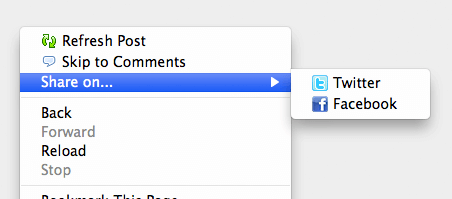
One of the hidden gems within the HTML5 spec is context menus. The HTML5 context menu spec allows developers to create custom context menus for given blocks within simple menu and menuitem elements. The menu information lives right within the page so there's no need to create a custom plugin. Let me show you how you can create your own custom context menus from basic HTML!
The HTML
Let's first start by defining a block of HTML and assigning the ID of the menu nodes to be used:
<section contextmenu="mymenu">
	<!--
		For the purpose of cleanliness,
		I'll put my menu inside the element that will use it
	-->
</section>
With the block defined, now it's time to create the additional context menu items for the given block:
<menu type="context" id="mymenu">
	<menuitem label="Refresh Post" onclick="window.location.reload();" icon="/images/refresh-icon.png"></menuitem>
	<menuitem label="Skip to Comments" onclick="window.location='#comments';" icon="/images/comment_icon.gif"></menuitem>
	<menu label="Share on..." icon="/images/share_icon.gif">
		<menuitem label="Twitter" icon="/images/twitter_icon.gif" onclick="goTo('//twitter.com/intent/tweet?text=' + document.title + ':  ' + window.location.href);"></menuitem>
		<menuitem label="Facebook" icon="/images/facebook_icon16x16.gif" onclick="goTo('//facebook.com/sharer/sharer.php?u=' + window.location.href);"></menuitem>
	</menu>
</menu>
With a base menu tag with the type of context and id to match the context attribute for the blog it's to be used for, menu items or submenus may be created. Menu items may have label, icon, and onclick attributes to represent design and actions. Actions can have predefined functions or inline javascript code, just as any element can. Multiple parents can use the same menu, so no need to repeat the same menus.
This is where I'd insert more detail, but this is so damn easy that there's no point in boring you...
Mozilla Firefox is currently the only browser to support this API. I wouldn't consider adding context menus a critical necessity but the ability to do so is quite nice, and I plan to add them to my blog soon. This API is the epitome of "used for enhancement and wont harm". My "share" example is fairly basic and supplemental; have an scenario which the contextmenu API may be more useful? Share!





Great! context menus.
But only FF :(
At this point, yes, but I anticipate other browser vendors implementing context menus.
Yeah… sadly, like you and many others I’m sure, still waiting :/
2014… still waiting
2016…
Don’t blame me!
Still waiting 2018, but no. I do not think they will ever add it…
Hi David,
This is a very interesting feature, I was just wondering if you could remove or hide any of the system context menu items? otherwise I think that the use of these context menu could be limited for application use.
Motti
Good question. Couldn’t find anything in the way of more documentation, but I’m assuming you could display:none; an element to hide it.
My initial idea is audio / video controls for players… Play, pause, stop, rewind, fast-forward, etc…
That’s a really nice idea :)
Why isn’t there the icon ( /images/share_icon.gif ) in the screenshot?
I noticed the same thing and also in testing, it seems icons can only be “attached” to menuitem and not menu which is a shame.
Hola David, te sigo hace bastante y me gustaría que hagas screencast que son muy útiles para aprender. Saludos desde Argentina. Martin.
I’m wondering if that is really a good idea.
I can already see a bunch of websites polluting our context menu…
totaly agree.
It should be clear what part is influenced by the site itself
Interesting that even with disabling JavaScript in the browser the items still appear in the context menu, but selecting them does nothing. I know this was just a demo, but it seems like maybe if browsers are going to implement context menu items in this manner, we should take a more progressively enhanced approach and only apply these menu elements to the page using JavaScript. That way, if JS is unavailable these items don’t appear in the menu and therefore won’t cause confusion for the user when they don’t work as expected.
Great thought Jason, I didn’t try without JavaScript. I’ll update this tutorial soon!
Great stuff even if only in firefox supported!
Awesome! I really like HTML5, and I’m sad that it’s still not widely supported. I’d love to see Chrome support for this feature, too.
I reach this site because I’ve read somewhere that only firefox support this feature!
I’m developping using netbeans & google chrome, so I’m still waiting for help (no want use JQuery context-menu)
Great stuff David!
I just hope that site creators do not begin to fill the context menu with unnecessary things and, of course, all browsers support this feature (Internet Explorer is not a valid browser, in my opinion :P )
I use to say that IE isn’t a web browser
This is a hidden gem.
As you mention, full browser support is required for this to be a viable option for clients sites, but getting ahead of the game and understanding the principles always help (none of this is rocket science).
Made this idea into a Pligg module (http://forums.pligg.com/free-modules/22146-right-click-context.html).
wow, great tutz david. Very good idea, i`m using javascript before and now i can use this for FF users.
i hope other vendors have this too.
thank you very much.
I love how every coding blog has this douche in the comments.
hey David,
Its an amazing example for a beginners like me.. Really appreciate your work. I was just trying what our friend Motti was discussing with you, removing the system context menu items. Can you help me out? Which element should I display as none?
Any way to hide the default context menu items? So you don’t have double “Play” menu items for player controls and such.
Hey David,
Is there any other way to contact you for technical assistance other than posting on your blog?
Hello,
Sorry for my bad english.
If I have more than an element which uses the same contextmenü, how am I able to know, which contextmenu was clicked?
Thomas131
Are there an easy way to use jQuery when adding such menu?
Sure, you can use jQuery for anything.
Uuuh, so how can I get jQuery to bring me a fresh coffee? ;)
My hope was, that someone would give a few lines of code as example how and wehre to start.
Allowing developers to remove the default context menu items would be trivial to replace “View page source” or “Save image as …” with potentially malicious JavaScript code.
There needs to be some mechanism to identify which context menu items have been added by the site.
We’ve been doing this on Vimeo since we re-launched I only just remembered that this feature existed! Sucks that this has been stale in every other browser for 3+ years =[
We used to be able to prevent crap like this with (using FF as an example), changing
dom.event.contextmenu.enabled=falsein the browser config. But with HTML5, there’s nothing we can do to avoid random websites doing whatever the heck they want to the context menu. :-(Even FF’s own coding site, developer.mozilla.org, stuffs crap into the context menu that can’t be avoided. I’ve been trying to strip it out using a custom Adblock filter, but apparently that’s just not viable. I was hoping to not have to revert to use a stream filter like Privoxy.
It will support to all browsers(chrome,safari,firefox…..)
This is really quite nice – sad to see that the other big-3 browsers haven’t adopted it.
I love the demo – but there’s so much more in that… I have a specific need to know where the click occurred but can’t figure out how to get that into my javascript.
OK – I just realized that I ran the demo above in Safari – so in spite of indications otherwise – apparently it does work. I was unable to get the example above to work in Safari – but no problem in Firefox.
Sorry – I see now. It does only work in Safari. Sorry for the newbie churn.
It can be used as a simple copyright notification, without blocking the user to copy the content. User friendly and non-intrusive : http://www.swissquote.ae
Now if svg is embedded inside html5, and I would like the popup menu to show up on right clicking an svg item. Is there any simple way to make this work (at least) in FF ? I have been looking for this, but it seems svg and html5 are not yet very seemlessly integrated. I am not an expert. Would I be better of doing this in a few years ?
Hi, Great tutorial and it works perfectly. I have one question, I have multiple items that the user can right click on and the same context menu will be displayed… how would i get which item was clicked? I’m using this feature so the user can right click or long hold on mobile and report an item. So i need to get the item id of which item the user clicked on…
Great post! also you can create your own context menu using jQuery. Explained here http://www.voidtricks.com/custom-right-click-context-menu/
It’s 2016, and it’s surprising to see no support in Chrome.
Chrome not supporting?!?!?!…
The HTML5 Context menu will be removed from all browsers. So no, Chrome support is not happening and FF will also remove support.
https://developer.mozilla.org/en-US/docs/Web/HTML/Global_attributes/contextmenu
This was working in Chrome up until version 61, when they ripped all the code out. Pretty frustrating and definitely a step backwards.
Great article… didn’t know this was possible with HTML5. The only suggestion I would submit is that the very first sentence of this article say: “Mozilla Firefox is currently the only browser to support this API”.
Unfortunately, this hasn’t been possible for years, as the contextmenu spec was removed from the HTML spec, as well as menuitem items.
When I separate the code into an HTML file, a CSS file and a JS file I run into a problem where it complains about the line in the JS code:
var menu = document.querySelector("context-menu");
var menuItems = menu.querySelectorAll(".context-menu-item");
With the following error:
What is the issue?
It’s 2025. I’m using FireFox. I am unable to see your custom context menu in the demo. :(