
dwProgressBar v2: Stepping and Events
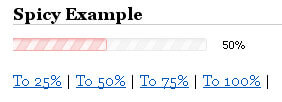
dwProgressBar was a huge hit when it debuted. For those of you who didn't catch my first post, dwProgressBar is a MooTools 1.2-based progress bar which allows for as much flexibility as possible. Every piece of dwProgressBar can be controlled by CSS classes or options passed in when initiating the class. It's been a month since version 1 debuted and now I'm proud to give you dwProgressBar version 2.
What's New?
Stepping - Stepping allows for you to set a "step" percentage if you know you'll be incrementing the progress bar by the same amount each time. You no longer need to pass in the percentage to animate to.
onComplete Event - A complete event now fires when the progress bar hits 100%.
onChange Event - A change event now fires whenever the progress bar moves.
Allow More - This setting allows you to tell the progress bar if it should be allowed to reach more than 100%.
Enough of the boring stuff. Here's how to use it.
The CSS
#box			{ border:1px solid #ccc; width:200px; height:12px; }
#perc			{ background:#ccc; height:12px; }

#box2			{ background:url(progress-bar-back.gif) right center no-repeat; width:200px; height:20px; float:left; }
#perc2			{ background:url(progress-bar.gif) right center no-repeat; height:20px; }
#text			{ font-family:tahoma, arial, sans-serif; font-size:11px; color:#000; float:left; padding:3px 0 0 10px; }
I've not changed anything with regard to CSS.
The XHTML
Basic Example
<div id="put-bar-here"></div>
<br />
<a href="" rel="25" class="mover">To 25%</a> |
<a href="" rel="50" class="mover">To 50%</a> |
<a href="" rel="75" class="mover">To 75%</a> |
<a href="" rel="100" class="mover">To 100%</a> |
<a href="" class="stepper">Step 10</a>
<br /><br />
<h2 style="margin-bottom:10px;">Spicy Example -- Events and Stepping</h2>
<div id="put-bar-here2"></div>
<br /><br />
<a href="" rel="25" class="mover2">To 25%</a> |
<a href="" rel="50" class="mover2">To 50%</a> |
<a href="" rel="75" class="mover2">To 75%</a> |
<a href="" rel="100" class="mover2">To 100%</a> |
<a href="" class="stepper2">Step 15</a>
Nothing has changed with the XHTML either.
The MooTools 1.2 JavaScript
var dwProgressBar = new Class({

	//implements
	Implements: [Events, Options],

	//options
	options: {
		container: $(document.body),
		boxID:'',
		percentageID:'',
		displayID:'',
		startPercentage: 0,
		displayText: false,
		speed:10,
		step:1,
		allowMore: false
	},

	//initialization
	initialize: function(options) {
		//set options
		this.setOptions(options);
		//create elements
		this.createElements();
	},

	//creates the box and percentage elements
	createElements: function() {
		var box = new Element('div', {
			id:this.options.boxID
		});
		var perc = new Element('div', {
			id:this.options.percentageID,
			'style':'width:0px;'
		});
		perc.inject(box);
		box.inject(this.options.container);
		if(this.options.displayText) {
			var text = new Element('div', {
				id:this.options.displayID
			});
			text.inject(this.options.container);
		}
		this.set(this.options.startPercentage);
	},

	//calculates width in pixels from percentage
	calculate: function(percentage) {
		return ($(this.options.boxID).getStyle('width').replace('px','') * (percentage / 100)).toInt();
	},

	//animates the change in percentage
	animate: function(go) {
		var run = false;
		if(!this.options.allowMore && go > 100) {
			go = 100;
		}
		this.to = go.toInt();
		$(this.options.percentageID).set('morph', {
			duration: this.options.speed,
			link:'cancel',
			onComplete: this.fireEvent(go == 100 ? 'complete' : 'change', [], this.options.speed)
		}).morph({
			width:this.calculate(go)
		});
		if(this.options.displayText) {
			$(this.options.displayID).set('text', this.to + '%');
		}
	},

	//sets the percentage from its current state to desired percentage
	set: function(to) {
		this.animate(to);
	},

	//steps a pre-determined percentage
	step: function() {
		this.set(this.to + this.options.step);
	}

});
The Usage
//once the DOM is ready
window.addEvent('domready', function() {

	/* create the progress bar for example 1 */
	pb = new dwProgressBar({
		container: $('put-bar-here'),
		startPercentage: 25,
		speed:1000,
		boxID: 'box',
		percentageID: 'perc',
		step:10,
		allowMore: 1
	});

	/* create the progress bar for example 2 */
	pb2 = new dwProgressBar({
		container: $('put-bar-here2'),
		startPercentage: 10,
		speed:1000,
		boxID: 'box2',
		percentageID: 'perc2',
		displayID: 'text',
		displayText: true,
		step:15,
		onComplete: function() {
			alert('Done!');
		},
		onChange: function() {
			alert('Changed!');
		}
	});

	/* movers */
	$$('.mover2').each(function(el) {
		el.addEvent('click',function(e) {
			e.stop();
			pb2.set(el.get('rel'));
		});
	});

	$$('.mover').each(function(el) {
		el.addEvent('click',function(e) {
			e.stop();
			pb.set(el.get('rel'));
		});
	});

	/* steppers */
	$$('.stepper').each(function(el) {
		el.addEvent('click',function(e) {
			e.stop();
			pb.step();
		});
	});

	$$('.stepper2').each(function(el) {
		el.addEvent('click',function(e) {
			e.stop();
			pb2.step();
		});
	});

});
Please note that I'm creating two progress bars above, not just one.
Click here to see a working example. It will blow your mind!
How did I do? Anything missing? Any suggestions for a version 3? Share your thoughts!





Hi David,
great stuff as usual!
I have one suggestion:
On the last step, the progress bar should fire both events onComplete AND onChange, because the last step also changes the status of the bar.
I think their might be situations where you want to know, when the status change, even it is the last step. Now maybe you end up with writing the same code in both events just to know when the bar changes.
@Thomas: That would be a quick change. I thought that firing both wouldn’t be necessary, but you do have a point there.
this is great :) very good job
What will happen if the width of #box is not set in pixels but in percentages i.e. 100%? How will the function calculate work? It seems that fx.slide does not work with percentages.
hi David
in version 3 can you make it something like user will click on link light box will open and progress bar will start and after 100% display message and light box auto close