
Better Pull Quotes with the Dojo Toolkit
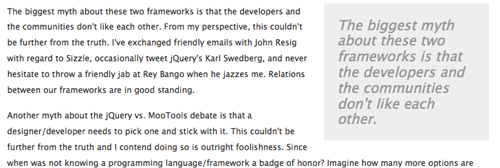
Chris Coyier authored a post titled Better Pull Quotes: Don't Repeat Markup a while back. In his post he created great-looking pull quotes without repeating any content -- instead he uses jQuery to dynamically create the pull quotes. A few months back I demonstrated this technique using MooTools. The following is the Dojo method for doing so.
The HTML
<p><span class="pull-me">As a MooTools "insider", however, I'm excited for what the MooTools team will bring to the table during 2010.</span> We'll be launching the Forge (our public plugin repository), releasing MooTools 2, continuing to grow MooTools More, featuring more community work, and much more. MooTools FTW!</p>
The HTML above features a paragraph of content with a SPAN tag wrapping what I'd like to be the pull quote.
The CSS
.quote { padding:20px; margin:0 0 20px 20px; font-size:20px; font-style:italic; background:#eee; color:#999; display:block; width:200px; float:right; }
You may style the quote any way you'd like. These elements are traditionally large in text with italicized text and a different background color.
The Dojo Tookit JavaScript
dojo.addOnLoad(function() {
	dojo.query('span.pull-me').forEach(function(spanquote) {
		dojo.create('span',{
			'class': 'quote',
			innerHTML: spanquote.innerHTML
		},spanquote.parentNode,'first');
	});
});
We find each element with a "pull-me" CSS class and generate a new element with our "quote" class. We then inject the new element into the original element's parent. That's all!
Chris did a great job with the execution of his idea. This is a technique that will likely be used well into the future.






cool, i think it should be helpful for a magazine or something, regards.