
Create a Sprited Navigation Menu Using CSS and MooTools
CSS sprites are all the rage these days. And why shouldn't be? They're easy to implement, have great upside, and usually take little effort to create. Dave Shea wrote an epic CSS sprites navigation post titled CSS Sprites2 - It's JavaScript Time. In his post he outlined a method for enhancing the CSS sprite menu with jQuery. I loved his post so much that I converted his jQuery CSS sprites menu to MooTools.
The Sprite Image
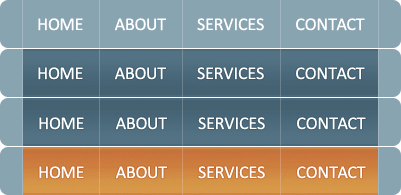
This is a great example of an efficient, useful sprite image.
The HTML
<ul id="nav">
	<li id="home" <?php echo $current == '' || $current == 'home' ? 'class="current"' : ''; ?>><a href="?home">Home</a></li>
	<li id="about" <?php echo $current == 'about' ? 'class="current"' : ''; ?>><a href="?about">About</a></li>
	<li id="services" <?php echo $current == 'services' ? 'class="current"' : ''; ?>><a href="?services">Services</a></li>
	<li id="contact" <?php echo $current == 'contact' ? 'class="current"' : ''; ?>><a href="?contact">Contact</a></li>
</ul>
My code mostly mirrors the original ALA post's code but I've chose to use IDs instead of CSS classes.
The CSS
#nav { width: 401px; height: 48px; background: url(sprites-blue-nav.gif) no-repeat; position: absolute; top: 100px; left: 100px; padding:0; }
#nav li { display: inline; }
#nav li a:link, #nav li a:visited { position: absolute; top: 0; height: 48px; text-indent: -9000px; overflow: hidden; z-index: 10; }

#home a:link, #home a:visited { left: 23px; width: 76px; }
#home a:hover, #home a:focus { background: url(sprites-blue-nav.gif) no-repeat -23px -49px; }
#home a:active { background: url(sprites-blue-nav.gif) no-repeat -23px -98px; }
#home.current a:link, #home.current a:visited { background: url(sprites-blue-nav.gif) no-repeat -23px -147px; cursor: default; }
.nav-home, .nav-home-click { position: absolute; top: 0; left: 23px; width: 76px; height: 48px; background: url(sprites-blue-nav.gif) no-repeat -23px -49px; }
.nav-home-click { background: url(sprites-blue-nav.gif) no-repeat -23px -98px; }

#about a:link, #about a:visited { left: 100px; width: 82px; }
#about a:hover, #about a:focus { background: url(sprites-blue-nav.gif) no-repeat -100px -49px; }
#about a:active { background: url(sprites-blue-nav.gif) no-repeat -100px -98px; }
#about.current a:link, #about.current a:visited { background: url(sprites-blue-nav.gif) no-repeat -100px -147px; cursor: default; }
.nav-about, .nav-about-click { position: absolute; top: 0; left: 100px; width: 82px; height: 48px; background: url(sprites-blue-nav.gif) no-repeat -100px -49px; }
.nav-about-click { background: url(sprites-blue-nav.gif) no-repeat -100px -98px; }

#services a:link, #services a:visited { left: 183px; width: 97px; }
#services a:hover, #services a:focus { background: url(sprites-blue-nav.gif) no-repeat -183px -49px; }
#services a:active { background: url(sprites-blue-nav.gif) no-repeat -183px -98px; }
#services.current a:link, #services.current a:visited { background: url(sprites-blue-nav.gif) no-repeat -183px -147px; cursor: default; }
.nav-services, .nav-services-click { position: absolute; top: 0; left: 183px; width: 97px; height: 48px; background: url(sprites-blue-nav.gif) no-repeat -183px -49px; }
.nav-services-click { background: url(sprites-blue-nav.gif) no-repeat -183px -98px; }

#contact a:link, #contact a:visited { left: 281px; width: 97px; }
#contact a:hover, #contact a:focus { background: url(sprites-blue-nav.gif) no-repeat -281px -49px; }
#contact a:active { background: url(sprites-blue-nav.gif) no-repeat -281px -98px; }
#contact.current a:link, #contact.current a:visited { background: url(sprites-blue-nav.gif) no-repeat -281px -147px; cursor: default; }
.nav-contact, .nav-contact-click { position: absolute; top: 0; left: 281px; width: 97px; height: 48px; background: url(sprites-blue-nav.gif) no-repeat -281px -49px; }
.nav-contact-click { background: url(sprites-blue-nav.gif) no-repeat -281px -98px; }
Unfortunately there's plenty of CSS. That's generally the one downside of using sprites but the payoff comes with less requests to the server. My CSS differs from the original ALA post in that I accommodate for my IDs.
The MooTools JavaScript
(function($) {
	window.addEvent('domready',function() {
		$('nav').getElements('li').each(function(li) {
			//settings
			var link = li.getFirst('a');
			//fix background image
			if(!li.hasClass('current')) {
				link.setStyle('background-image','none');
			}
			//utility div
			var div = new Element('div',{
				'class': 'nav-' + li.get('id'),
				opacity: 0
			}).inject(li);
			//background imagery
			li.addEvents({
				mouseenter: function() {
					div.fade('in');
				},
				mouseleave: function() {
					div.fade('out');
				},
				mousedown: function() {
					div.addClass('nav-' + li.get('id') + '-click');
				},
				mouseup: function() {
					div.removeClass('nav-' + li.get('id') + '-click');
				}
			});
		});
	});
})(document.id);
My MooTools version is less code and slightly more efficient as I'm not creating and disposing of the same DIVs over and over as the user hovers over each menu item. The menu has original, selected, hovered, and mousedown states. Awesome!
Do you use sprites for any of your menus? Share a link to a few -- I'd love to see what you've done!





Some bugs:
1. Demo page menu overlaps with the site footer.
2. When pressing mouse button on any of the menu items and then dragging the pointer out of the button and THEN releasing the button, the mousedown state is not reset to the original state, making the menu text move a little on hover.
Firefox 3.5.4
@Anton: Both of those worked for me easily.
Oh my goodness! Could you format the CSS better please? :P
@Chris the Developer: Don’t pass out! If you understand one block for one navigation item, you understand them all!
If you removed the text (very generic anyways), you could hugely reduce your css, and you gif, and make it modular, so you could easily take away or add any menu item.
I get sometimes you need the image text though.
I’m all for what Adam Meyer is saying.
The added comfort of being able to add navigation buttons from your CMS is great.
Besides the fact that search engines don’t like images in menus.
@Adam Meyer: Yes, but then you have to use horisontal repeating backgrounds, which isn’t always applicable…
Search engines don’t dislike images in menus. That is a bad generalization. For SEO this uses an image replacement technique. Look at the HTML and you can easily still see the plain link text in there.
Google etc. will index this fine.
One thing to note though, on FF 3.5.4 on OS X all of the inactive links except for the rightmost have an annoying pixel twitch going on. Likely just a bad negative position in the css.
Oh yeah, I didn’t read through the code but as you said it’s fine for search engines.
But it’s still a downside to have to modify the links using photoshop but not a CMS.
It’s all good though in cases were there is no need to edit the menu.
I use this trick on my website…I absolutely love it and I receive countless compliments on the navigation on my site. I think the CSS isn’t that bloated…it’s trying to do a lot!
I’ve been using jquery to run the animation but I like this mootools answer…degrades just as nicely too. Thanks David!
It’s strange to me to see all the comments about removing the text from the images for sake of modularity.
This would hardly be an article on *sprites* if there were no images. It’s a little like saying “You could just get rid of the CSS completely, and the javascript, and then the page would load faster.”
Any time you use sprites, you’re going to have a lot of CSS for all the background positions and typically suffer a hit to modularity. But some sites are high design, and that’s how you have to roll.
I usually have one file called `sprites.png` that’s an aggregation of almost all the pages graphics, and two named `repeat-x.png` and `repeat-y.png`, for obvious reasons.
I believe I have everything set up properly, I have examined and re-examined the code, but I can’t figure out why the .current class isn’t registering. The file validates yet something is broken.
http://morganhirtle.ca/tmp/hirtles
nice article and I agree with almost everything, but I think you create a new problem, where people are forced to make their point in the first three lines or 140 characters which isn’t necessarily a good thing.
Oooooh. Pretty! :D
Is it possible to use the standard mootools lib to get this, because of have other mootools gadgetss on teh same page and this and esp the snook nav didn’t play nicely with them because of different commands for teh same call. I am still just a noob.
This is nifty, but what if you want to turn your menu into an include file so that it will dynamically call the JS and CSS?
Currently you are indicating the home page and the about page are the current page in the php of the li….so, how would one go about setting this up?
Thanks and super job!
@Paul: If you want that you could use only the background Image and place the seperators and text dynamicly.
That would require you to add a class to the li’s ( eg. li.MenuItem ) and style them all at once. The id would remain for JavaScript purposes.
You could then use li.MenuItem:hover to change the text colors.
The php would then use either a while loop or a foreach to render the li’s inside the ul.
$q = mysql_query("SELECT * FROM menu_table ORDER BY sort");
while( $row = mysql_fetch_array($q) ){
   if( $_GET['page'] == $row['id'] ){ $current = 'Current'; }
    echo '' . $row['text'] . '';
    $current = '';
}
* Although after reading through the javascript I don’t see the ID being used for anything but CSS styling. You would of course just create one master class for all the elements.
From what it seems it would be
This of course needs some modification to fit into your application but I hope this helps you as to how one would approach this.
oops, the html rendres so I hand to make another go at this
$q = mysql_query("SELECT * FROM menu_table ORDER BY sort"); while( $row = mysql_fetch_array($q) ){ if( $_GET['page'] == $row['id'] ){ $current = 'Current'; } echo '<a href="?page=' . $row['id'] . '" rel="nofollow">' . $row['text'] . '</a>'; $current = ''; }@Arnar G: OH! Great response Arnar, thanks!
Buuut, I guess I should have been more clear. I was thinking in terms of using it for specific images, such as a handful of thumbnails in a sprite format, for a portfolio. That way I wanted to use it as an include file for multiple pages.
I’ve seen other solutions for CSS for hyperlinks and current page that identified the current page in the body tag as an id or at the top of the page with a PHP tag. Had hoped there might be an easy solution for this sample code too.
Cheers!
Really cool.. :)
what if i have to call the .js without using php? can any 1 help me withthat…
I have been trying to figure out how to make the link for the current pages. So far I have been unsuccessful in writing code that works.
I have this:
ul.rollover-ex li a:current { background-position: 0 -300px;}
ul.rollover-ex li.button2 a:current { background-position: 0 -750px; }
ul.rollover-ex li.button3 a:current { background-position: 0 -1200px; }
ul.rollover-ex li.button4 a:current { background-position: 0 -1650px; }
ul.rollover-ex li.button5 a:current { background-position: 0 -2100px; }
ul.rollover-ex li.button6 a:current { background-position: 0 -2550px; }
But it seems I may need to designate each button for the page it is associated with and I’m not sure how to write that in.
Any suggestions?
focusing not working, I even downloaded that .php file from your website and put it on my hosting but it’s not working yet, could please give me a hand where my mistake could be, thank you a lot