Submit Button Enabling
"Enabling" you ask? Yes. We all know how to disable the submit upon form submission and the reasons for doing so, but what about re-enabling the submit button after an allotted amount of time. After all, what if the user presses the "stop" button immediately after submitting the form? They'd be screwed. Why not re-enable the submit button after an allotted amount of time so that the user may re-submit?
The MooTools JavaScript
window.addEvent('domready',function() {
		var subber = $('submit');
		subber.addEvent('click',function() {
			subber.set('value','Submitting...').disabled = true;
			(function() { subber.disabled = false; subber.set('value','Resubmit'); }).delay(10000); // how much time?  10 seconds
		});
	});
Of course, this isn't ideal in all situations. It is, however, a nice touch if your system can accommodate for it.
Update: Upon submission, the button's message changes to "submitting..." and once enabled, the message changes to "Resubmit." Thank you to Facundo Corradini for the suggestion!
![Serving Fonts from CDN]()
For maximum performance, we all know we must put our assets on CDN (another domain). Along with those assets are custom web fonts. Unfortunately custom web fonts via CDN (or any cross-domain font request) don't work in Firefox or Internet Explorer (correctly so, by spec) though...
![Designing for Simplicity]()
Before we get started, it's worth me spending a brief moment introducing myself to you. My name is Mark (or @integralist if Twitter happens to be your communication tool of choice) and I currently work for BBC News in London England as a principal engineer/tech...
![Duplicate the jQuery Homepage Tooltips]()
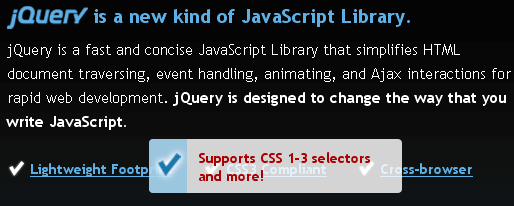
The jQuery homepage has a pretty suave tooltip-like effect as seen below:
The amount of jQuery required to duplicate this effect is next to nothing; in fact, there's more CSS than there is jQuery code! Let's explore how we can duplicate jQuery's tooltip effect.
The HTML
The overall...
![MooTools Text Flipping]()
There are lots and lots of useless but fun JavaScript techniques out there. This is another one of them.
One popular April Fools joke I quickly got tired of was websites transforming their text upside down. I found a jQuery Plugin by Paul...