
MooTools TextOverlap Plugin
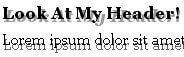
Developers everywhere seem to be looking for different ways to make use of JavaScript libraries. Some creations are extremely practical, others aren't. This one may be more on the "aren't" side but used correctly, my TextOverlap plugin could add another interesting design element to a website.
The XHTML
<h2 class="overlap">Look At My Header!  Isn't It Something?</h2>
<p class="overlap">
	Lorem ipsum dolor sit amet, consectetuer adipiscing elit. Nullam et nisl. Aliquam justo justo,
	posuere vel, blandit non, vulputate at, nisl. Nunc scelerisque pulvinar lectus.
</p>
Nothing special here. Just a page's content given an overlap class.
The CSS
.overlapper	{ color:#999; font-style:italic; z-index:-1; position:absolute; border-bottom:0; }
.overlapperp{ color:#666; z-index:-2; position:absolute; }
The above CSS code will be applied to the respective Moo-generated overlap element. You'll assign classes to the overlap when you create an instance of TextOverlap.
The MooTools JavaScript
var TextOverlap = new Class ({

	//implements
	Implements: [Options],

	//options
	options: {
		offsety: 1,
		offsetx: 1,
		elements: $$('h1'),
		container: $$('body')[0],
		overlapClass: ''
	},

	//initialization
	initialize: function(options) {
		//set options
		this.setOptions(options);
		//do the overlap
		this.overlap();
	},

	//overlap the previoius text
	overlap: function() {
		this.options.elements.each(function(el) {

			//get original position
			var pos = el.getPosition();

			//create a new element
			var over = new Element(el.get('tag'),{
				'class': this.options.overlapClass,
				'style':'left:' + (pos.x + this.options.offsetx) + 'px;top:' + (pos.y + this.options.offsety) + 'px;position:absolute;',
				'text':el.get('html')
			});
			over.inject($$('body')[0]);
		}, this);
	}
});
The class accepts the following options:
- offsety: y coordinate difference in the overlap
- offsetx: x coordinate difference in the overlap
- elements: collection of elements to apply the overlap to
- container: container in which to inject the overlap. Usually the BODY element.
- overlapClass: class to apply to the overlap element
Once the instance is created, the class creates a new element for each element in the collection, adds the respective class/style attributes, and positions the class at the specified offsets. Simple!
The Moo Usage
window.addEvent('domready', function() {
	/* header */
	var myOverlap = new TextOverlap({
		offsety: 3,
		offsetx: 2,
		elements: $$('h2.overlap'),
		overlapClass: 'overlapper'
	});
	/* text */
	var myOverlap2 = new TextOverlap({
		elements: $$('p.overlap'),
		overlapClass: 'overlapperp',
		offsetx: 1,
		offsety: 0
	});
});
Two separate instances are used for creating effects on the header and the paragraph. Different options are given to each effect.
I would hate for someone to get too wild with this class. Use it sparingly but effectively.





It does not look good if words don’t wrap the same. I could see it working to give a pseudo drop shadow effect. Maybe nicer to have the shadow fade-out or fly off to just draw attention.
Hey, interesting. Just reminds me of the css text-shadow property. I would say you’ve provided us with a fresh cross-browser compatible solution here. Is there anything like a blur effect (not the event) in mootools to complete this text-shadow simulation?
@kermalicious: I don’t think a blur effect is possible with javascript. Maybe PHP though.
Depending on the type of blur you want, you could get a blur effect by stacking layers that fade to the background color with very small offsets between the layers. If you go in a single direction it would provide a motion blur effect. If you were to circle the characters with layers a small gaussian blur would appear. The effects would have to be really subtle, and would be nowhere close to as effective as an actual blur filter.
You could also jiggle the background text a little to give an effect that the user cannot focus. This will cause their eyes to blur the text while trying to get it into focus.
None of this stuff should really be used anywhere though, unless you are trying to design a “cool” myspace page.
@david: I found this script to generate blur on the fly with js :
http://www.webveteran.com/portfolio/demos/javascript-blur/
Sadely, it isn’t based on Mootools. If anyone has the same but base on Mootools, I’m really interested.