React Emoji Picker

By  on  

When emojis first hit the web scene I rolled my eyes -- they seemed like a lame communication method for giggling kids.  After years more experience working remotely, managing open source communities, and communicating with people that may not get my sense of humor, I've realized that emojis go a long way in representing the tone of comment.  Emojis have a way of bringing levity to any online comment or debate, most notably seen to me on GitHub pull requests and issue comments.

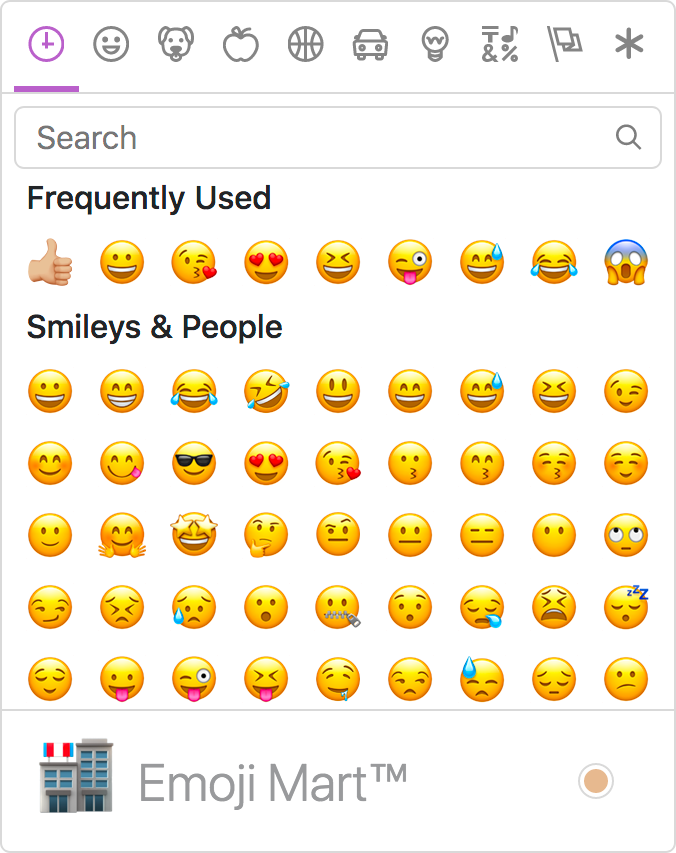
There's an amazing React library out there called Emoji Mart; Emoji Mart is a highly customizable emoji popup widget that allows you to very easily add an emoji UI to any React project!
React Emoji

Let's have a look at a few of the customization options of Emoji Mart:

import 'emoji-mart/css/emoji-mart.css'
import { Picker } from 'emoji-mart'
 
<Picker set='emojione' />
<Picker onSelect={this.addEmoji} />
<Picker title='Pick your emoji…' emoji='point_up' />
<Picker style={{ position: 'absolute', bottom: '20px', right: '20px' }} />
<Picker i18n={{ search: 'Recherche', categories: { search: 'Résultats de recherche', recent: 'Récents' } }} />

Online communities thrive on the ability to communicate effectively, and when you consider language barriers and sense of humor, emojis are no laughing matter.  Emoji Mart is easy to implement and was reliable during all of my testing!

Recent Features

  • By
    CSS Animations Between Media Queries

    CSS animations are right up there with sliced bread. CSS animations are efficient because they can be hardware accelerated, they require no JavaScript overhead, and they are composed of very little CSS code. Quite often we add CSS transforms to elements via CSS during...

  • By
    Responsive and Infinitely Scalable JS Animations

    Back in late 2012 it was not easy to find open source projects using requestAnimationFrame() - this is the hook that allows Javascript code to synchronize with a web browser's native paint loop. Animations using this method can run at 60 fps and deliver fantastic...

Incredible Demos

  • By
    Introducing MooTools Templated

    One major problem with creating UI components with the MooTools JavaScript framework is that there isn't a great way of allowing customization of template and ease of node creation. As of today, there are two ways of creating: new Element Madness The first way to create UI-driven...

  • By
    Link Nudging with CSS3 Animations

    One of the more popular and simple effects I've featured on this blog over the past year has been linking nudging.  I've created this effect with three flavors of JavaScript:  MooTools, jQuery, and even the Dojo Toolkit.  Luckily CSS3 (almost) allows us to ditch...

Discussion

    Wrap your code in <pre class="{language}"></pre> tags, link to a GitHub gist, JSFiddle fiddle, or CodePen pen to embed!