
Change Category Slug within WordPress
When I first started this blog, I set the category "slug" to "sugar." Why sugar? Because a lot of a good thing is candy; thus, a bunch of MooTools tutorials is as sweet as sugar. While I get a giggle out of calling my categories sugar, Google doesn't find it nearly as funny, nor does Yahoo or Bing. In an effort to increase my SEO, I wanted to change my category slug to "tutorials." That's where the awesome Redirection plugin and a simple regular expression comes into place.
Changing the Slug
You can very easily change the category slug within WordPress's admin panel by navigating to Settings >> Permalinks:
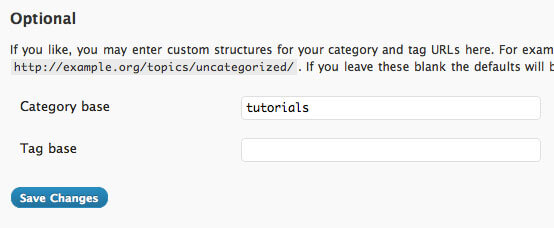
I changed the slug from "sugar" to "tutorials."
WordPress Redirection
So why do we need the Redirection plugin? Because search engines like Google and users who have bookmarked your site will try to reach the old address. Thus, we need an appropriate redirect to push them to the new address. Not only do we need a redirection plugin but we need it to be reliable. I've been using Redirection for years so I knew this would be the best route.
While Redirection allows you to make a simple URL to URL redirection, I needed something a bit more powerful since almost anything could be after "/sugar/" in the URL. What I did was use Redirection's regular expression capabilities to create a wildcard search on the URL to redirect all "/sugar/" URLs to "/tutorials/" URLS:
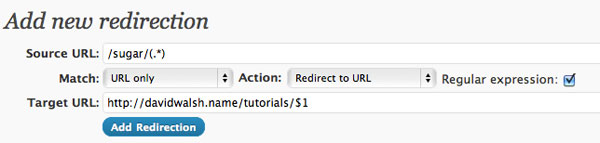
And there I have it; all category URLs are redirected as they should be! The (*) in the source URL grabs the text after "/sugar/" in the URL and the $1 in the Target URL places that text after the new category slug!
The Redirection plugin for WordPress is outstanding. As I mentioned above, I've used it for years, have hundreds of redirections in place, and it's always been one of my most trusted plugins. Thanks to John Godley for his great plugin!






That works well if you’re changing category base. However, if you’re familiar with htaccess (granted most WordPress owners aren’t) and don’t want to use a plugin, you could do the following:
Furthermore, if you’re migrating your legacy category structure over to tags (via the admin) and want to prevent broken links, you could write a rule to handle the change:
RewriteEngine On
RewriteBase /
RewriteRule ^category(?:/[^/]+)*(/[^/]+) tag$1 [L,R=301]
(Where ‘category’ was the old structure and ‘tag’ is the new structure. The regex handles sub-categories, which now become hierarchy-less tags.)
Yep, you can edit .htaccess directly, but that can be cumbersome for those who aren’t well versed with coding rewrites.
“/me likes simon post”
I definitely prefer to use a plugin for something like this. My .htacess file is bloated enough.
I think this solution is for one category… what if i want to change many category’s slug? help would be appreciated
i have a big problem and maybe you can help me.
site/category/apple and site/apple are showing me the same thing. how can i redirect the second one to the first one through htaccess.
my post structure is site/apple/id/post/
thanks
Hi,
Thanks for this!
I recently changed my url structure from
http://theadventurouswriter.com/quipstipsworkingworld/
to
http://theadventurouswriter.com/working/
And now I need to reroute the incoming links so they go to the correct place.
I tried inserting the urls themselves in the Redirection plugin’s source and target fields, but that didn’t work.
Can you tell me what to insert in the source and target fields, to make this plugin work for me?
Cheers,
Laurie
I am having the same issue as targoviste, As he said: “site/category/apple and site/apple are showing me the same thing” is this normal? How do I fix this?
Лучший, популярный кинозал Mediavir.Ru. Смотреть онлайн и скачать новинки кино в хорошем качестве: боевики, фэнтези.
Сайт объявлений о продаже, покупке товаров во всех городах России от частных лиц и фирм
The best is to think wisely when you set up the site and stick to the link structure you’ve chosen. It’s almost impossible to redirect all the links Google already has indexed.
That was exactly what I was looking for. Thanks for that! Luckily my site has not been up for too long so my category change hopefully won’t be too much of an issue.
купить квартиру в подмосковье, продажа вторичных квартир в подмосковье, купить квартиру эконом в подмосковье
Excellent and straight forward explanation. Thanks for the help!
Good article, but the plugin consumes too many resources for redirection 301.
I’m actually working on a massive category change for my site and this has been one of the best explanations of redirects I’ve read since researching the topic. Also thanks for the recommendation on the redirection plugin, I noticed you can also configure it to write the redirects you put in it into your htaccess instead of just wordpress. :)
Thanks for this easy explanation David! I wouldn’t have been able to figure out the regular expression thingy without your clear example.
I have been searching for exactly this solution. Thank you so much!
Works perfectly. Thank you very much!
Thanks a lot for this post. Really help me out. By the way, you do have a post, where I can read more about how to edit the size of the category text. It will be great if describe it by editing the code in the Editor section. All the best and keep writing such a great posts.
Hi
Is it possible to change category slug only for some categories? (for example I have 10 categories I want to change category slug for 2 of them, in other 8 categories I want no change in slug)
About the section “Changing the Slug”, it is not the category slug, it is the category_base conf. Category slug is the friendly version of a category name.