Submit Button Enabling
"Enabling" you ask? Yes. We all know how to disable the submit upon form submission and the reasons for doing so, but what about re-enabling the submit button after an allotted amount of time. After all, what if the user presses the "stop" button immediately after submitting the form? They'd be screwed. Why not re-enable the submit button after an allotted amount of time so that the user may re-submit?
The MooTools JavaScript
window.addEvent('domready',function() {
		var subber = $('submit');
		subber.addEvent('click',function() {
			subber.set('value','Submitting...').disabled = true;
			(function() { subber.disabled = false; subber.set('value','Resubmit'); }).delay(10000); // how much time?  10 seconds
		});
	});
Of course, this isn't ideal in all situations. It is, however, a nice touch if your system can accommodate for it.
Update: Upon submission, the button's message changes to "submitting..." and once enabled, the message changes to "Resubmit." Thank you to Facundo Corradini for the suggestion!
![Regular Expressions for the Rest of Us]()
Sooner or later you'll run across a regular expression. With their cryptic syntax, confusing documentation and massive learning curve, most developers settle for copying and pasting them from StackOverflow and hoping they work. But what if you could decode regular expressions and harness their power? In...
![Serving Fonts from CDN]()
For maximum performance, we all know we must put our assets on CDN (another domain). Along with those assets are custom web fonts. Unfortunately custom web fonts via CDN (or any cross-domain font request) don't work in Firefox or Internet Explorer (correctly so, by spec) though...
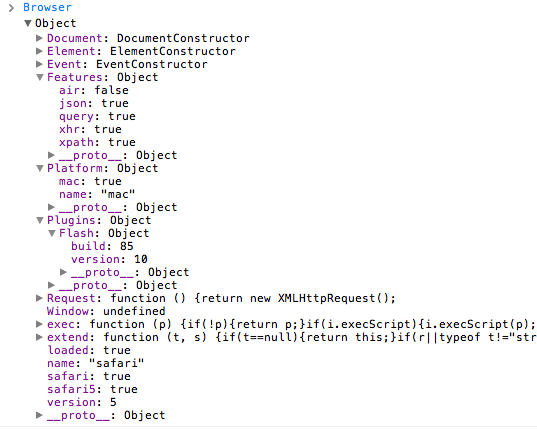
![MooTools 1.3 Browser Object]()
MooTools 1.3 was just released and one of the big additions is the Browser object. The Browser object is very helpful in that not only do you get information about browser type and browser versions, you can gain information about the user's OS, browser plugins, and...
![Drag and Drop MooTools File Uploads]()
Honesty hour confession: file uploading within the web browser sucks. It just does. Like the ugly SELECT element, the file input is almost unstylable and looks different on different platforms. Add to those criticism the fact that we're all used to drag and drop operations...