Submit Button Enabling
"Enabling" you ask? Yes. We all know how to disable the submit upon form submission and the reasons for doing so, but what about re-enabling the submit button after an allotted amount of time. After all, what if the user presses the "stop" button immediately after submitting the form? They'd be screwed. Why not re-enable the submit button after an allotted amount of time so that the user may re-submit?
The MooTools JavaScript
window.addEvent('domready',function() {
		var subber = $('submit');
		subber.addEvent('click',function() {
			subber.set('value','Submitting...').disabled = true;
			(function() { subber.disabled = false; subber.set('value','Resubmit'); }).delay(10000); // how much time?  10 seconds
		});
	});
Of course, this isn't ideal in all situations. It is, however, a nice touch if your system can accommodate for it.
Update: Upon submission, the button's message changes to "submitting..." and once enabled, the message changes to "Resubmit." Thank you to Facundo Corradini for the suggestion!
![From Webcam to Animated GIF: the Secret Behind chat.meatspac.es!]()
My team mate Edna Piranha is not only an awesome hacker; she's also a fantastic philosopher! Communication and online interactions is a subject that has kept her mind busy for a long time, and it has also resulted in a bunch of interesting experimental projects...
![Create Namespaced Classes with MooTools]()
MooTools has always gotten a bit of grief for not inherently using and standardizing namespaced-based JavaScript classes like the Dojo Toolkit does. Many developers create their classes as globals which is generally frowned up. I mostly disagree with that stance, but each to their own. In any event...
![9 Mind-Blowing WebGL Demos]()
As much as developers now loathe Flash, we're still playing a bit of catch up to natively duplicate the animation capabilities that Adobe's old technology provided us. Of course we have canvas, an awesome technology, one which I highlighted 9 mind-blowing demos. Another technology available...
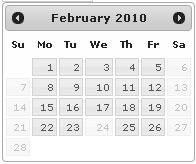
![jQuery UI DatePicker: Disable Specified Days]()
One project I'm currently working on requires jQuery. The project also features a datepicker for requesting a visit to their location. jQuery UI's DatePicker plugin was the natural choice and it does a really nice job. One challenge I encountered was the...