Submit Button Enabling
"Enabling" you ask? Yes. We all know how to disable the submit upon form submission and the reasons for doing so, but what about re-enabling the submit button after an allotted amount of time. After all, what if the user presses the "stop" button immediately after submitting the form? They'd be screwed. Why not re-enable the submit button after an allotted amount of time so that the user may re-submit?
The MooTools JavaScript
window.addEvent('domready',function() {
		var subber = $('submit');
		subber.addEvent('click',function() {
			subber.set('value','Submitting...').disabled = true;
			(function() { subber.disabled = false; subber.set('value','Resubmit'); }).delay(10000); // how much time?  10 seconds
		});
	});
Of course, this isn't ideal in all situations. It is, however, a nice touch if your system can accommodate for it.
Update: Upon submission, the button's message changes to "submitting..." and once enabled, the message changes to "Resubmit." Thank you to Facundo Corradini for the suggestion!
![Create Namespaced Classes with MooTools]()
MooTools has always gotten a bit of grief for not inherently using and standardizing namespaced-based JavaScript classes like the Dojo Toolkit does. Many developers create their classes as globals which is generally frowned up. I mostly disagree with that stance, but each to their own. In any event...
![CSS Animations Between Media Queries]()
CSS animations are right up there with sliced bread. CSS animations are efficient because they can be hardware accelerated, they require no JavaScript overhead, and they are composed of very little CSS code. Quite often we add CSS transforms to elements via CSS during...
![CSS Background Animations]()
Background animations are an awesome touch when used correctly. In the past, I used MooTools to animate a background position. Luckily these days CSS animations are widely supported enough to rely on them to take over JavaScript-based animation tasks. The following simple CSS snippet animates...
![Duplicate the jQuery Homepage Tooltips Using MooTools]()
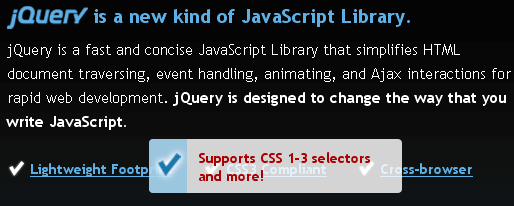
The jQuery homepage has a pretty suave tooltip-like effect as seen below:
Here's how to accomplish this same effect using MooTools.
The XHTML
The above XHTML was taken directly from the jQuery homepage -- no changes.
The CSS
The above CSS has been slightly modified to match the CSS rules already...