
Basic AJAX Requests Using MooTools 1.2
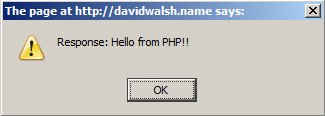
AJAX has become a huge part of the modern web and that wont change in the foreseeable future. MooTools has made AJAX so simple that a rookie developer can get their dynamic pages working in no time.
Step 1: The XHTML
<p>
	<a href="https://davidwalsh.name/demo/moo-basic-ajax-example.php" id="ajax-alert">Click here</a> to receive a special message from a PHP script via a JavaScript alert.
</p>
<p>
	<a href="https://davidwalsh.name/demo/moo-basic-ajax-example.php" id="ajax-replace">Click here</a> to populate the element below with the special message.
</p>
<div id="message-here">
	Special message will appear here.
</div>
Here we define two links and a message box. Both links will trigger AJAX calls but there's a difference in how the result is handled. The first will take the response and output the response in a JavaScript alert box. The second link makes an AJAX call but returns the result into the message box.
Step 2: The PHP
echo 'Hello from PHP!!';
There's very little PHP involved. In this case, we do no "real" programming -- just a simple echo statement.
Ste 3: The MooTools JavaScript
//on dom ready...
window.addEvent('domready', function() {

	/* ajax alert */
	$('ajax-alert').addEvent('click', function(event) {
		//prevent the page from changing
		event.stop();
		//make the ajax call
		var req = new Request({
			method: 'get',
			url: $('ajax-alert').get('href'),
			data: { 'do' : '1' },
			onRequest: function() { alert('Request made. Please wait...'); },
			onComplete: function(response) { alert('Response: ' + response); }
		}).send();
	});

	/* ajax replace element text */
	$('ajax-replace').addEvent('click', function(event) {
		//prevent the page from changing
		event.stop();
		//make the ajax call, replace text
		var req = new Request.HTML({
			method: 'get',
			url: $('ajax-replace').get('href'),
			data: { 'do' : '1' },
			onRequest: function() { alert('Request made. Please wait...'); },
			update: $('message-here'),
			onComplete: function(response) { alert('Request completed successfully.'); $('message-here').setStyle('background','#fffea1');
			}
		}).send();
	});
});
To create an AJAX request, you must create an instance of the Request class. We provide our request with the method (either get or post), the URL to ping, optional data information, and optional onRequest and onComplete event handlers.
In the first block, we accept the response in the onComplete event handler and alert it out to the screen. The second MooTools block uses the Request.HTML class instead of the Request class. Use the Request.HTML class when you intend to replace a specified element's innerHTML with the AJAX request's response.





Note that the YUI team recommends using “GET” for AJAX when possible. Good primer on MooTools AJAX, David!
I like using $_GET too, unless there’s a ton of data being passed, in which case why use Ajax?
I’m not a coder, for me this tutorial is a really nice starting point :)
Anyway I don’t like Ajax so much, it is often a bad solution because of accessibility issues.
I’m upgrading my site to mootools 1.2 and I can not find where the parameter ‘data’ is used for. Can you tell me where it is for?
@Crispjin: Good question. I use “data” because some hosting providers don’t allow empty ajax requests. Dreamhost is one of those providers. For that reason I always use “data”, even though there is a populated querystring.
I am having a problem with the Request. In my site I am using URI Segments. When I am on the page I want to make the request from I use Segment 3 as specific page, example “index.php/sites/view/1”.
“sites” is my controller ,”view” is my function within that controller and “1” is just a variable. When Request.HTML is launched it always put the full URL of the page I am on http://localhost/index.php/sites/view/1 + whatever page URL I put in the request. Subsequently my call will return the page I am on within the element that is updated. Is there a way to change the URL it is requesting? I have tried to replace the whole URL with no change. It just adds the whole URL to the URL. Also the request will vary if the URI has a trailing”/”. If the slash is there the request adds the last segment, no slash it removes the segment becasue it thinks the last segement is file. Any suggestions would be greatly appreciated. By the way, great tutorial, Thanks.
This just made my day. Thanks for this tutorial!
Whats the name PHP file. How call from XTML with parameter?
thank you for this great example. it works but the request is always ‘undefined’ and i don’t know why. Have you any idea about the reason? thank you.
Try this instead – with onTimeout also which is awesome:
http://code.google.com/p/mootimeout/
Request = new Class({
    Extends: Request,

    options: {
        /*onTimeout:$empty,*/
        timeout:false
    },

    send: function(options){
        var timeout=(this.options.timeout || (options ? options.timeout: null));
        if (timeout) {
            this.timeoutTimer=window.setTimeout(this.callTimeout.bindWithEvent(this), timeout);
            this.addEvent('onComplete', this.removeTimer);
        }
        return this.parent(options);
    },

    callTimeout: function () {
        if (!this.running) return this;
        this.running = false;
        this.xhr.abort();
        this.xhr.onreadystatechange = $empty;
        this.xhr = new Browser.Request();
        this.onFailure();
        this.fireEvent('onTimeout');
    },

    removeTimer: function() {
        window.clearTimeout(this.timeoutTimer);
    }
});

function updateContent(placeholder, page, ident, returnPage) {
    var req = new Request({
        method: 'get',
        async: true,
        url:'http://dev.247ms.com/servlets/2452306090224Dispatch/31/jspforward',
        evalScripts: true,
        timeout: 2000,
        headers: {'Pragma': 'no-cache'},
        // Url parameters
        data: {
            file: './home/msh/html/shopTemplateAjax/index.jsp',
            page: page,
            flush: 'true',
            ident: ident,
            returnPage: returnPage,
            returnPlaceholder: placeholder
        },
        // Show ajax loder gif prior to request
        onRequest: function(item) {
            $(placeholder).innerHTML = "<center><img src='http://dev.247ms.com/~msh/shopTemplateAjax/public/pix/ajax-loader.gif'/></center>";
        },
        // Show requested HTML and eval script tags
        onSuccess: function(html) {
            $(placeholder).set('html', html);
        },
        // Alert response text.
        onFailure: function(item) {
            //  alert(item.responseText);
        },
        onTimeout: function(item) {
            updateContent(placeholder, "ajax/timeout", ident, page);
        }
    }).send();
}
I also found the cause of my problems – it was a race condition within my java servlet where my response object got nullified by the next ajax request – so case closed for me :)
Thanks very much!
Howdi David,
I love your posts and tutorials. They’re all organized so well and your site is clean and easy to navigate :)
I had a question. Is there an easy way to make the url:
$('ajax-alert').get('href'), part of this script triggered by a js variable rather than a fixed ID or that would break it? That way one could do multiple ajax requests from different links on a page.thank u thank u thank u!!!!
Hi David,
Very nice and easy tutorial, however it would be nice to see how to get <form data from HTML and pass it to request…
regards
Thanks,
Great as always. I keep coming to your articles again and again!!! :)
/Johan
Hi David, i am a big fan of your blog, saludos desde Mexico
I get the following error
[Exception… “‘Permission denied to call method XMLHttpRequest.open’ when calling method: [nsIDOMEventListener::handleEvent]” nsresult: “0x8057001e (NS_ERROR_XPC_JS_THREW_STRING)” location: “” data: no]
I got this to work on a project i was working on. The only problem that i am having now is that i am calling to load a div with another jsp page. And nothing is loading correctly. Not loading the styles or the javascript form that page. Is their any way around this or am i taking the wrong approach.
Hi David, i need use request.Html and Milkbox, can you help me? My code is:
    $('ajax-replace_i').addEvent('click', function(event) {
        event.stop();
        var req = new Request.HTML({
            method: 'get',
            url: 'http://localhost/toqueintimo/includes/verao_inf.php',
            data: { 'do' : '1' },
            update: $('thumbs'),
            onRequest: function() { alert('Aguarde...'); },
            onSuccess: function(response){
                var milkbox2 = new Milkbox();
                milkbox2.reloadGalleries();
                alert('Milkbox...');
                },
            onComplete: function(response) { alert('Request completed successfully.');}
        }).send();
    });
Thanks,
just last week i finished my first ever “application” that consisted of php and mootools, it was a guesbook format where the user had to add edit and delete comments
as it was the first time that i had used mootools or any javascript, the lectures managed to make it really hard for me to understand what the hell was going on,
and now here it is, an easy to understand intro to the way that MT and PHP can communicate together
now i MAY be able to redo ma assignment – a lot better
thanks for these cool tutorials
Hi,
Nice tutorial.
While implementing this, I stuck here: (I am using ‘accordion’)
I want to pass an unique ID with the request, so that i can grab some data associated with that ID thru PHP code (AJAX call).
Can you please let me know how to do that?
Thanks.
Cool intro. Thanks!
Thanks a lot.
can the data contain more variables like
data : { ‘para2’ : ‘1’, ‘para2’ : ‘2’ }
Mootools Doc says data is a string, but you have an array. I would like to know more about the systex.
Regards
Hello john,
Hi how do you doing, my name is Shashidhar i am working on mootools, i want one help, I am working on customizing Firewall rules like Add, Edit and Delete rules from UI. i am sending data to back-end and processing it using python an rendering data back to front-end using Cherrypy template.render. Now i want to format data in JSON format and render it back to front-end in Asynchronous way how can i do that please suggest with code thanking you in advance.
Hi,
You turn up on almost all solutions to problems I google! Thanks.
If I have a class initialized in
domreadylikeajaxer = new testClass('morelink');where morelink is the class of links
and such a link is present in multiple divs that I keep loading with your example;
I have come to understand that the class will not give love to this new content!
How do I make it do that?
I tried
onSuccess, but I end up having multiple instance of this class.Sorry the link would be <a href=”something” class=”more” >
Hi, I have very strange problem,when trying to make page navigation with this code.
On first click everything for great:
pager.php?start=10 id->clicker >
Now in pager.php it again generate this link
pager.php?start=20 id->clicker >
but clicking on link that is generated in pager.php, ajax request not working anymore and it just normal open pager.php
Any idea?
Thanks
Hi again,
sorry for previous post I didn’t know that will be formated on that way :(
Anyway I found where is problem. If you use your code and have only one of thid two ids but don’t have one of them javascript will not work.
In my case I have js file with 4 different id, but if on page don’t have one of them, nothing work.
Is possible to add some code to javascript work even if don’t found one of id ?
Thanks
Hello, first congratulations for your website is very helpful.
I’m working with Request.HTML , but there is a problem in ie7 when content is loaded asynchronously click events dblclick, etc. does not work.
I searched the web but not found a solution, here I leave a link to work correctly with ie8, firefox but not ie7.
http://n2.nabble.com/AJAX-problem-in-IE-with-onclick-event-td725779.html (description)
http://www.flitsit.nl/mootools-ajax/ (problem)
In advance thank you very much.
@Morten Slott Hansen: Hey! Could you specify further what the function needs to look like when called? I am trying to set this up and it won’t work :(
I would appreciate the help a lot!
Thanks, Stephen
@Stephen Moore: Please be more specific – it has been a while since my last posting and I am not really sure what it is that you need – sorry.
I’m currently moving towards jquery as it seems that mootools is going nowhere these days…
@Morten Slott Hansen: Thanks for your Response!
I am trying to use the MooTools Request Feature to update several individual divs on the page by having a function that I can submit to, which div element is to be updated and with what page.
I see you have something like this in your earlier comment to this post but I cannot quite sort the bits you provided. Could you tell me what I have to change in the mootools code, which is the JS defining the function, and what the function looks like?
Thanks a lot, I am trying my best but I am not too good at JS yet. Hence the working with the framework.
Stephen
@Morten Slott Hansen:
@Stephen Moore:
Ah yes – I think I know what you are getting at :)
The function “updateContent” takes two arguments. The first is the div id ie. ajax placeholder and the second is the url where the data is loaded from. Do to the nature of my setup I just specify the last part of the url – so what you could do here is to change the code to take a full url.
So look at the method updateContent and change it to something like:
function updateContent(placeholder, page) {
var req = new Request.HTML({
method: ‘post’,
async: true,
url:page,
// Show ajax loder gif prior to request
…
Ie. just pass the page parameter as the ajax url.
But if you want to make things really sweet just have a definition like
ajax content here…
and then loop over all elements with class=”ajax” and grap the title (which is a url) and load that into the div. This is sweet and makes things so much easier.
@Morten Slott Hansen:
auch – my reply got transformed…
The line ajax content here… should look like this:
<div class=”ajax” title=”http://mydomain.com/ajax/page1.html”>ajax content here…</div>
Hi all,
Superb script.
The only thing I’m struggling with, is that the script allows for merely 1 link.
I’d like to be able to accomodate an infinite amount of links with this great AJAX-script.
What I mean; the concent which is loaded depends on which link a person clicked :).
thnx in advance!!
Pretty cool code. Thank you! I can’t wait to try this out and start playing around with v1.2 of Mootools. I am stuck with 1.11 for now until Joomla ships out an update with the new version of Mootools.
I see in the example you refer to a specific link (whose id is ‘ajax-alert’)
now suppose I want to associate the request calling to a set of buttons whose ids are something like: ‘linkX’, ‘linkA’, ‘link123’, …
How shall I do? (please don’t say I should add
$('link-id').addEvent('click', function(event) {
...
for each button… they are dynamically generated though!
Hi David,
Stumbled upon this trying to figure out exactly WHY
Request.HTMLshould be preferred overRequest. The mootools documentation states that Request.HTML is “specifically made for receiving HTML”, but the only difference I can find is that the returns are different in theonSuccessevent.I prefer knowing “why” I am choosing one method over the other, thanks :)