
7 MooTools Plugins You Should Use on Every Website
The advantage of using unobtrusive JavaScript is that you can vastly improve the user experience for website visitors using just a snippet of code. And since the MooTools JavaScript framework's community is known for creating unique, quality plugins, I've compiled a list of plugins you MUST use on every website to take the user experience to the next level.
AutoGrow
I firmly believe that textareas and input boxes should provide a method for enlargement. AutoGrow takes any textarea element on the page and animates growth so that you can always see the complete text within a textarea.
Website & Download Example Usage
FancyForm
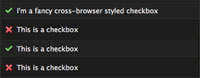
FancyForm is a checkbox replacement script used to beautify ugly checkbox and radio button elements. FancyForm's display is controlled completely by CSS and degrades well when the user doesn't have JavaScript available.
Website & Download Documentation Example Usage

Milkbox
No photo-featuring website is complete without a good lightbox script. Milkbox is an all-encompassing lightbox script that's easy to implement and adds a classy animated element to your website. Use Milkbox for flash video, photos, and XML galleries.
Website, Download, Documentation, & Example Usage
Quickboxes
Don't make your website visitors click a bunch of checkboxes. Quickboxes allows you to check multiple checkboxes in one mouse click and drag. I always recommend having a "check all" checkbox/link but many times your user will want to check a small range of checkboxes.
Website & Download Documentation Example Usage
SmoothScroll
Arguably the most famous and easiest to implement of all the MooTools plugins. SmoothScroll allows the page to animate down to an anchor within the page instead of the ugly jump that occurs by default.
Website & Download Documentation Example Usage
Tips
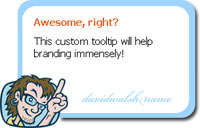
The default display of tooltips is ugly in both Windows and OSX. When you add a "title" attribute to an element, it's likely that you want the user to view it. Tips allows you to control how tooltips display so make them creative!
Website & Download Documentation Example Usage
ZebraTables
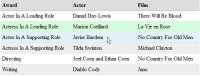
Long tables can be almost impossible to read. ZebraTables is an easy to implement MooTools class that provides alternate-row-coloring support, hover highlighting, and click coloring.
Website & Download Documentation Example Usage
There you have it -- 7 MooTools plugins you may effortlessly add to your websites to make them infinitely more usable.





Ok now at least 4 of these are essentials for new web design,
Thanks for the list, extremely useful to have a list of these tools :)
Regards
Craig
Nice stuff. Do you (or is there already) a way to easily do the smooth scrolling one with jQuery?
http://www.harkitek.com/contact is my latest and it uses. Autogrow, Slideshow, SmoothScroll and I’m implementing Tips on the next version. SqueezeBox is way cooler than Milkbox btw :)
Chris: Unfortunately I do not, but it seems easy enough to do. I’ll look into it.
I’m a squeezebox fan myself.
I like FancyForm, but I hesitate to use it because I’m afraid conversion of forms will be reduced by not presenting the user with standard UI. Don’t get me wrong, its sexy, but I just think it might confuse some people.
Great list David.
++ To SqueezBox. One plugin I love is Form Check;
Keep up the good work :)
Form Check is my preferred method of front end validation as well. It makes life simple.
amazing collection thanks david!
Just thought only jQuery can do it well, but I know I was wrong now :D MooTools is also awesome. Thanks for sharing
Because our objective is to replace every native interface element that our users are familiar with.
Wait, what?
Very useful tools, useful in almost any situation. The first few tools especially allow for a more professional, contemporary feel along with improved usability and appearance.
let me show you my perspective:
AutoGrow is a nice idea, but the UvumiTools Textarea Plugin goes deeper and does better!
FancyForm does well with radio buttons and checkboxes. If you want more html tags customized, customformelements.net is for you!
Milkbox is one of the nicest moo lightboxes out there, it can feel nicer though with some additional plug ins, let’s say, from the coders.me website.
The Quickboxes seem very enjoyable to me, too bad I don’t have any project that requires them yet.
SmoothScroll does beautiful work as a mootools more plug in.
These Tips are the first reason I started visiting your blog, so I’ve no complaints about it, neither have you I hope :p
As for the zebra tables, they remind me that OmniGrid from omnisdata.com website. Seems heavy like a tank, but it’s very light in size.
Thanks for the links.
As I only have experience in jQuery,this is a great opportunity to explore MooTools while looking into these.
Very useful tools that can be used in a variety of situations.
Wow, I love it, thanks you for the links :x
I wouldn’t use FancyForm. People are used to the standard controls on their OS. Websites should make use of them for a better user experience. This is the same reason Quickboxes doesn’t perform well in the wild. Nobody knows how it’s supposed to work and thus will stick to the traditional click everything pattern.
Hi @all!
I much like that Ajax stuff by myself. – But what do you do if a guests browser doesn’t use/has JS or JS is disabled?
Are there any existing solutions on the web? (I don’t think it’s a long-run solution building two websits for my users/guests – w & w/o JS…)
Thanks a lot!
sofar|sokai
Thank you sir, I’m flattered. But if you compare code sizes, this one is like one tenth of the uvumi one and it already does a great job (and the code looks smarter).
I didn’t know about quickbox, I implemented my own version last week, using event delegation.
About the milkbox and other lightboxes, I don’t know if they are “must have”, they kinda became cliché during the past two years (but I know, most of the time that’s just what the client wants)
oh great.. thanks for sharing.. i’ll be using these soon.. cheers!
Definitely one of the better lists around – thank you for sharing!
Isn’t they a UI libary available? Might use these on a web site soon and ditch jQuery for a little bit, see how I get on when I get my hands dirty with this!
MochaUI might be the thing you’re looking for Matt..
I actually wrote my own autogrow plugin but it suffered of the following problems (same goes for the one mentoined here, and also the one other sites use like facebook)
Issue 1: when autowrapping a line the textarea doesn’t autogrow. just try it make the last line long enough so it autowraps.
Issue 2: when copy-pasting multiple lines of text the textare does not grow.
Issue 3: drag n drop text doesn’t autoresize.
To my surprise the UvumiTools textarea plugin handles these quit well (except the last one) ! I didn’t know of this one, so great thanks to the commenter posting this one!
pretty nice stuff!
Milkbox is awesome. I’ll be putting that to good use…thanks for the heads up!
thanks for the information you provide, it is very useful
http://tulisan-wahyu.web.id
+1 for Milkbox – it is superb!
Helmuts